
View Asset: Related Tab
The Related tab on the asset detail view displays all assets that are related to the current asset, including parent and child relationships. From this tab, you can view related assets and add new relationships.
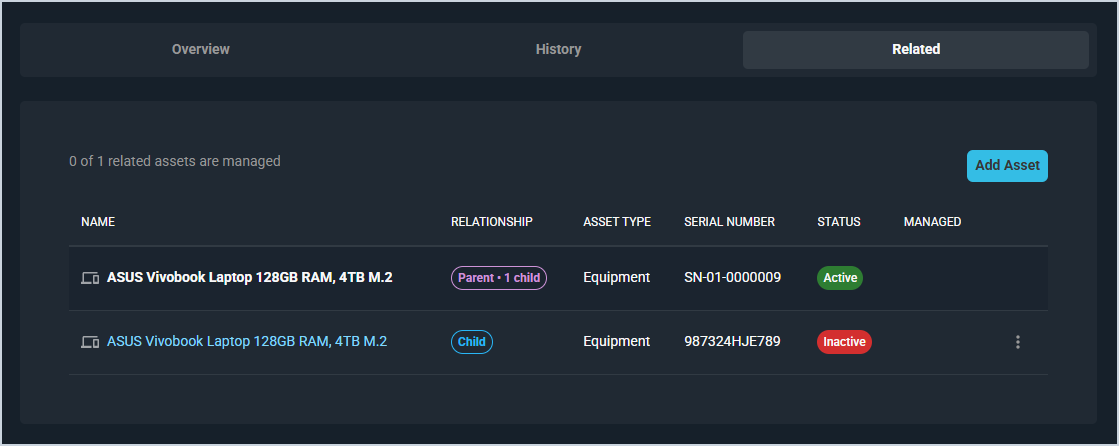
Each field on the Related tab is defined below.
| No. | Label | Definition |
|---|---|---|
| 1 | Name | Name of the related asset. Click the link to open the asset detail view. |
| 2 | Relationship | Relationship between the related asset and the current asset, such as Parent or Child. |
| 3 | Asset Type | Type of the related asset. |
| 4 | Serial Number | Serial number of the related asset. |
| 5 | Status | Current status of the related asset, displayed as a badge. |
| 6 | Managed | Indicates whether the related asset is managed through an RMM integration. |
The following actions are available on the Related tab.
- Add a related asset by clicking the Add Asset button.
- View a related asset by clicking the asset name link.
- Manage a related asset by clicking the ellipsis at the end of the row and selecting from the available menu options.
Tabs on the Asset Detail View
For information on other tabs on the asset detail view, see the related articles.