
View Agreement: Ticket Log Tab
The Ticket Log tab on the agreement details screen displays all tickets associated with the agreement, giving you a complete view of service activity covered under the agreement.
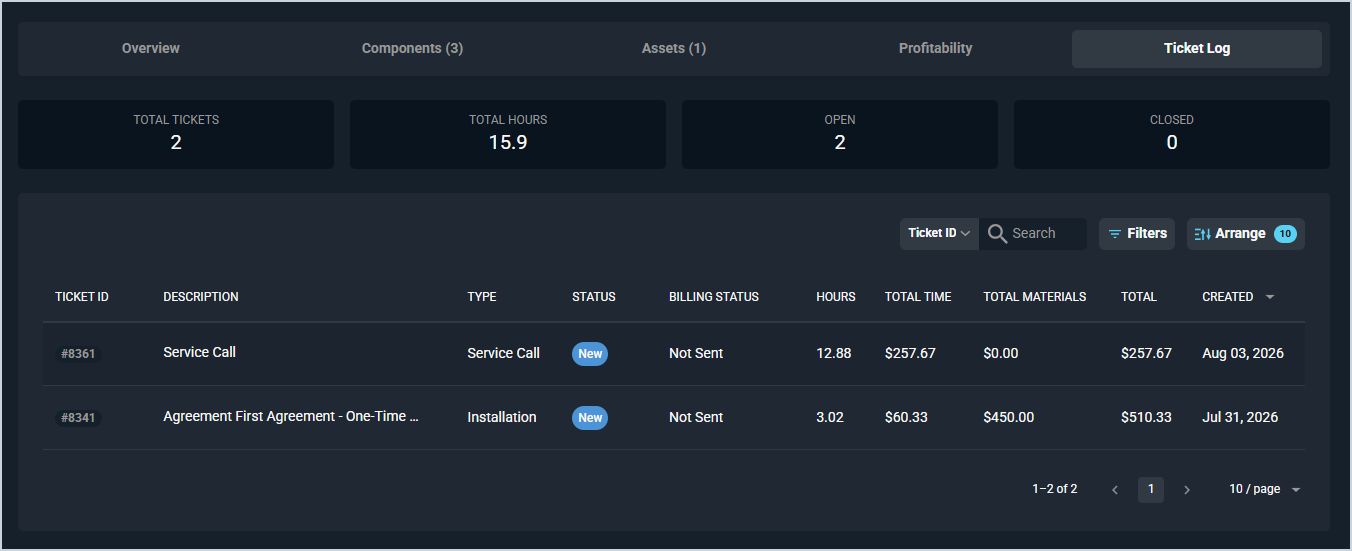
The following summary metrics display at the top of the tab.
| Metric | Definition |
|---|---|
| Total Tickets | Total number of tickets associated with the agreement. |
| Total Hours | Total hours logged across all tickets associated with the agreement. |
| Open | Number of currently open tickets associated with the agreement. |
| Closed | Number of closed tickets associated with the agreement. |
Each column in the ticket list is defined below.
| Label | Definition |
|---|---|
| Ticket ID | Unique numerical identifier for the ticket. |
| Description | Description of the work being done on the ticket. |
| Type | Type of the ticket. |
| Priority | Priority level of the ticket. |
| Severity | Severity level of the ticket. |
| Status | Current status of the ticket. |
| Billing Status | Billing status of the ticket. |
| Technician | Technician assigned to the ticket. |
| Hours | Hours logged on the ticket. |
| Total Time | Total time charges on the ticket. |
| Total Materials | Total materials charges on the ticket. |
| Total | Total charges on the ticket. |
| Primary Contact | Primary contact associated with the ticket. |
| Associated Contacts | Additional contacts associated with the ticket. |
| Tags | Tags applied to the ticket. |
| Associated Techs | Additional technicians associated with the ticket. |
The following actions are available on the Ticket Log tab.
- Search for a specific ticket by entering text in the Search field.
- Filter the list by clicking the Filters button.
- Customize which columns display in the list by clicking the Arrange button. See the Arrange Columns article for more information.
- Sort the list by clicking a column label in the table header.
- Open a ticket by clicking the ticket ID in the list.
For information on other areas of the agreement details screen, see the following articles.