Rev.io Mobile App: Customers
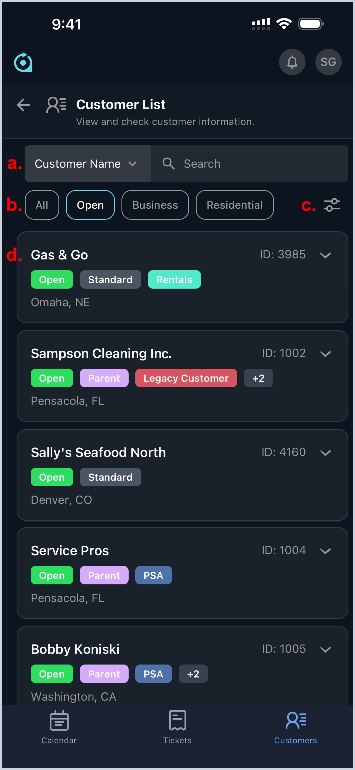
The Customer List screen in the Rev.io Mobile app provides quick access to your customer records with tools to search and filter results as needed. Each customer entry displays key details, and tapping a customer opens their profile where you can view and manage additional information. At this time, custom fields created for customers do not display in the Rev.io Mobile app.
- Select a category and search for customers in your database.
- Tap All, Open, Business or Residential to filter the customers displayed.
- Tap the filter icon to view additional customer filters.
- View details for the customer, including Customer Name, Customer ID, Status, Type, any tags, and the City and State of their address. Tap a customer to view and manage additional details. See the Rev.io Mobile App: Customer Details article for more information.