
System Settings: Mobile Options
The Mobile Options category on the System Settings screen allows you to configure the system-wide defaults that control how the mobile app's travel timer, work timer, and GPS tracking behave for technicians in the field. Settings configured here apply globally and drive mobile app behavior for all users assigned field work.
| NOTE: GPS settings currently cover geofence radius and activity note recording. Additional GPS functionality, including SMS notifications tied to the travel timer and a map view, is planned for a future release. |
Ticket Options
The Ticket Options section controls timer and time log defaults applied when a technician starts travel or begins work on a ticket via the mobile app.
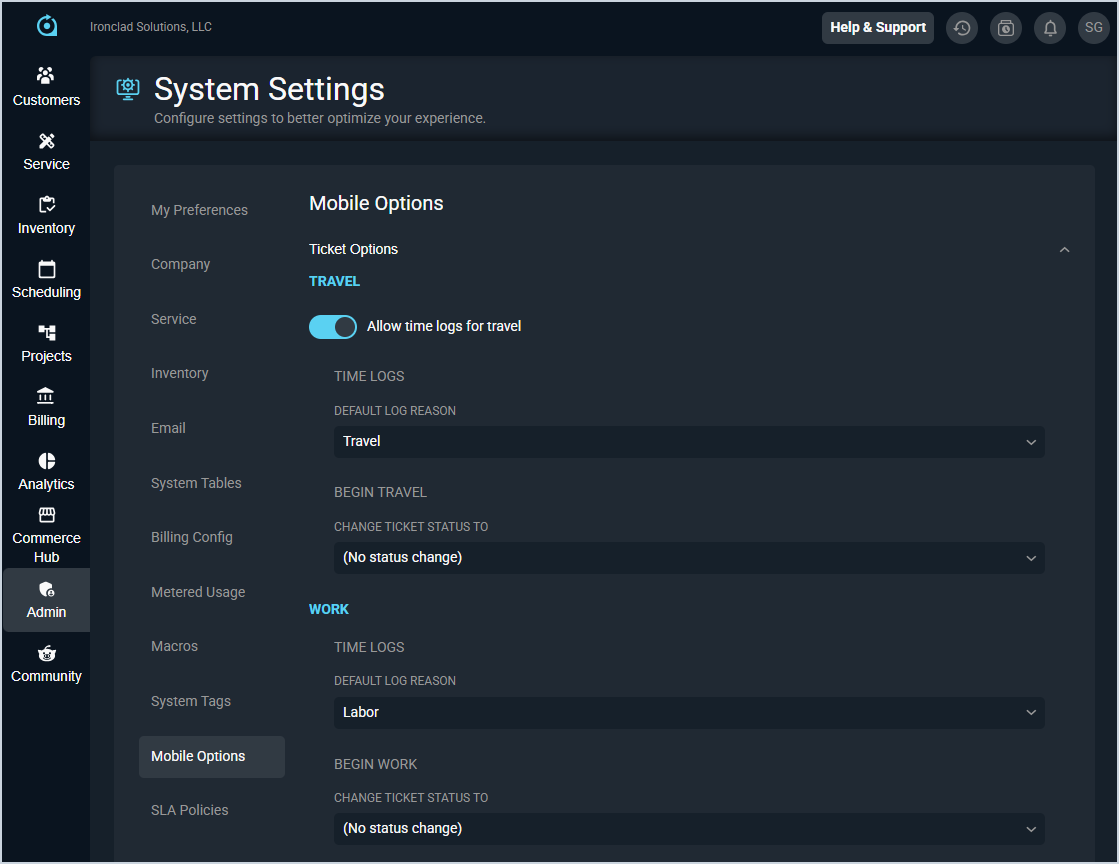
Each field in the Ticket Options section is defined below.
| No. | Label | Definition | |
| Travel | |||
| 1 | Allow Time Logs for Travel | Master toggle to enable or disable travel time logging on the mobile app. When enabled, the settings below become active. | |
| 2 | Default Log Reason (Travel) | Default log reason applied to time logs created for travel timers.
| |
| 3 | Change Ticket Status To (Begin Travel) | Ticket status automatically applied when the travel timer starts. Set to No Status Change to leave the ticket status unaffected. | |
| Work | |||
| 4 | Default Log Reason (Work) | Default log reason applied to time logs created for work timers. | |
| 5 | Change Ticket Status To (Begin Work) | Ticket status automatically applied when the work timer starts. Set to No Status Change to leave the ticket status unaffected. | |
GPS
The GPS section controls GPS tracking behavior and geofence configuration for field technicians.
| NOTE: If a ticket address does not have a valid GPS coordinate, GPS tracking and geofencing will be unavailable for that ticket. The mobile app will display a banner notifying the technician when this occurs. |
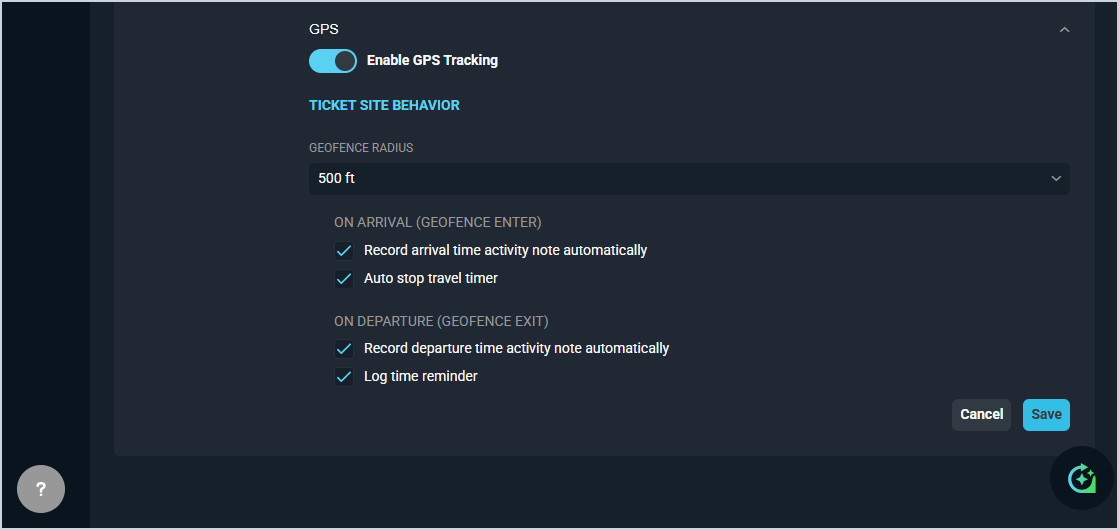
Each field in the GPS section is defined below.
| No. | Label | Definition |
| 1 | Enable GPS Tracking | Click to enable or disable GPS tracking for the mobile app. When disabled, all GPS-dependent features below are inactive. |
| Ticket Site Behavior | ||
| 2 | Geofence Radius | Radius used to define the geofence around a ticket site. Geofence Radius options include 250 ft and 500 ft. |
| On Arrival (Geofence Enter) | ||
| 3 | Record Arrival Time Activity Note Automatically | When checked, an activity note is automatically recorded on the ticket when the technician enters the geofence area (e.g., when the tech arrives at the ticket work site). |
| 4 | Auto Stop Travel Timer | When checked, the travel timer stops automatically when the technician enters the geofence. This field is only available when the Allow Time Logs for Travel option in the Ticket Options section is enabled. |
| On Departure (Geofence Exit) | ||
| 5 | Record Departure Time Activity Note Automatically | When checked, an activity note is automatically recorded on the ticket when the technician exits the geofence area. |
| 6 | Log Time Reminder | When checked, the technician receives a reminder to log time when leaving the ticket site. |