
Understanding Quote Profitability
Quotes now show profitability directly on the quote, so you can see revenue, cost, profit, and margin before you approve it. Profitability appears in two places: the financial cards at the top of the quote, and the Cost and Margin % columns for each product in the Products and Services section.

Each financial card at the top of the quote is defined below. Most cards also show the amount that comes from recurring products (MRR) and the amount that comes from one-time products (One-Time).
No. | Label | Definition |
|---|---|---|
1 | Revenue | The total amount charged on the quote, not including tax. The MRR and One-Time amounts are shown beneath the total. |
2 | Cost | The total cost of the products on the quote, with the MRR and One-Time amounts shown beneath the total. |
3 | Tax | The total tax on the quote. |
4 | Profit | The revenue minus the cost, with the MRR and One-Time amounts shown beneath the total. |
5 | Margin % | The profit as a percentage of the revenue, with the MRR and One-Time margins shown beneath the total. |
To see profitability for each product, expand a service in the Products and Services section. The Products list for the service includes the following columns.
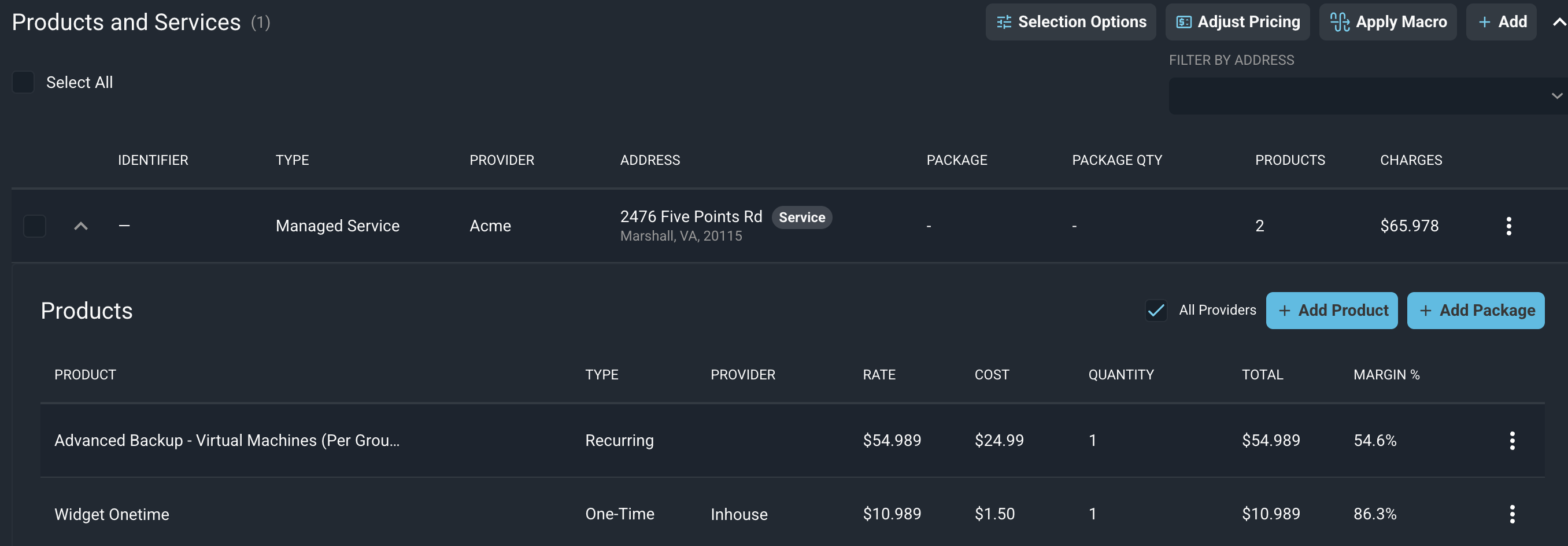
No. | Label | Definition |
|---|---|---|
1 | Product | Name of the product. |
2 | Type | Whether the product is recurring or one-time. Recurring products are included in the MRR amounts on the financial cards, and one-time products are included in the One-Time amounts. |
3 | Provider | Provider of the product. |
4 | Rate | Price of the product. |
5 | Cost | Cost of the product. |
6 | Quantity | Quantity of the product on the quote. |
7 | Total | Total charge for the product. |
8 | Margin % | Margin percentage for the product, based on its rate and cost. |
NOTE: Products that do not have a cost show a margin of 100%, and the margin on the quote will be higher than your actual margin until costs are entered. |
The financial cards and product columns update as you add, edit, or remove products and when you adjust pricing. See the Adjusting Quote Pricing article for more information about applying a markup or markdown to the price or cost of products on a quote.
Related Articles