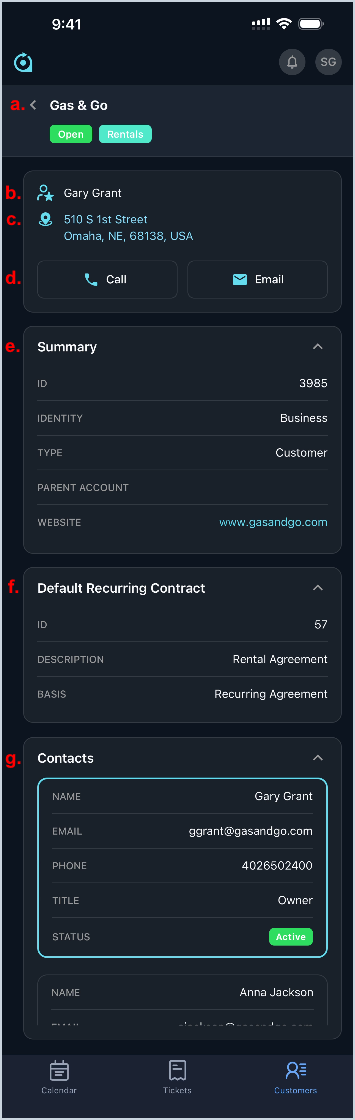
Rev.io Mobile App: Customer Details
The Customer Details screen in the Rev.io Mobile App provides view-only access to key customer information for quick reference while you work. From this screen, you can review customer details, contacts, and related information to gain context on open tickets and activities without modifying customer records. At this time, custom fields created for customers do not display in the Rev.io Mobile app.
- View the Customer Name, Status, and tags.
- View the Primary Contact for the customer.
- Tap the address icon to open the customer's address in your default mapping application.
- Tap the Call or Email buttons to contact the Primary Contact on the customer.
- View summary details for the customer, including Customer ID, Identity, Type, Parent Account, and Website.
- View the default recurring contract for the customer, including Contract ID, Description, and Basis.
- View contacts for the customer, including Name, Email, Phone, Title, and Status. The primary contact is outlined in blue.