
✨AI-Powered: Ask Revii
Ask Revii is Rev.io's AI assistant embedded directly in Rev.io. It helps you get fast, contextual answers and complete day-to-day tasks more efficiently without needing to navigate multiple screens. Clicking the Revii icon at the bottom of any screen in Rev.io opens the chat interface, where you can start a new conversation or return to a previous one at any time.
Ask Revii is designed to take action inside Rev.io. If something can be done through the Rev.io interface, Ask Revii can usually help you do it faster. You can use Ask Revii to help with everyday workflows such as managing customers, tickets, billing, assets, and more. For example, you can ask it to create or update tickets, add or edit customers and contacts, log time, create assets, manage inventory, or get guidance on how to complete a task in Rev.io.
To use Ask Revii, simply type your question or request in natural language, such as "Create a ticket for customer 3985 reporting a billing issue." Revii will guide you through the process or complete the action for you when possible.
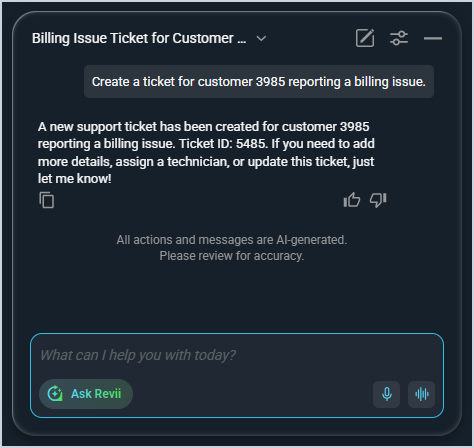
The following actions are available in the Ask Revii chat interface.
- Return to a previous conversation by selecting it from the list of past chats using the dropdown on the left side of the window.
- Start a new conversation at any time by clicking the New Chat icon in the upper right corner of the chat window.
- Edit your AI voice chat preferences by clicking the settings icon in the upper right corner of the chat window.
- Minimize the chat window by clicking the minus icon in the upper right corner of the chat window.
- Copy a response for use in other areas of the application by clicking the copy icon in the bottom left corner of the response.
- Provide feedback to help the AI model improve by clicking the thumbs up or thumbs down icons in the bottom right corner of the response.
- Switch to the Revii Data Analytics mode by clicking the Ask Revii button in the lower left corner of the chat window and selecting the Revii Data Analytics option. See the AI-Powered: Revii Data Analytics article for more information.
- Speak to Revii with your microphone by clicking the Dictate or Voice Mode icons in the lower right corner of the chat window.
| NOTE: Ask Revii is best for task execution, guidance, and workflow assistance. To analyze your business data or explore trends, use Revii Data Analytics instead. See the AI-Powered: Revii Data Analytics article for more information. |