
Customer Profile: Quotes Section - Opportunities Tab
The Opportunities tab in the Quotes section of the customer profile displays all opportunities associated with the customer. This gives you a quick view of the customer's deal history and current pipeline activity without leaving the customer profile. 'Opportunities' in Rev.io are potential deals or sales engagements associated with a customer account. They allow your sales team to track the progress of a deal from initial interest through to close, including key details such as the expected value, target close date, opportunity type, and current stage in the sales process.
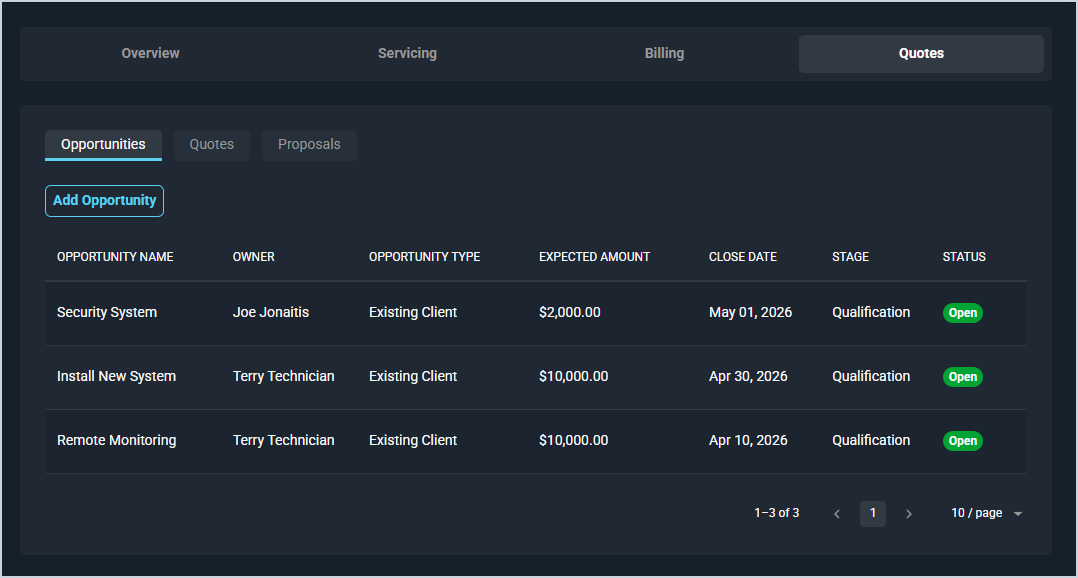
Each field on the Opportunities tab is defined below.
| No. | Label | Definition |
| 1 | Opportunity Name | Name of the opportunity. |
| 2 | Owner | The user responsible for managing the opportunity. |
| 3 | Opportunity Type | The type of opportunity, such as Existing Client or New Business. |
| 4 | Expected Amount | The estimated value of the opportunity in dollars. |
| 5 | Close Date | The target date for closing the opportunity. |
| 6 | Stage | The current stage of the opportunity in the sales pipeline. |
| 7 | Status | The current status of the opportunity. Status options include Open, Closed Won, and Closed Lost. |
These actions are available on the Opportunities tab.
- Add a new opportunity for the customer by clicking the Add Opportunity button. See the Add/Edit Opportunities article for more information.
- Sort the results in the table by clicking the column label in the table header.
- View the opportunity details by clicking the opportunity row. See the View Opportunity Details article for more information.