
Customer Profile: Quotes Section - Proposals Tab
The Proposals tab in the Quotes section of the customer profile displays all proposal documents that have been sent to the customer. While quotes are the records managed internally in Rev.io, proposals are customer-facing, signable documents sent to the customer for review and approval. Any proposal added to a quote is automatically reflected on this tab, giving you a complete view of all proposal activity for the customer in one place. Proposal templates can be managed in the Admin Module. See the Proposal Templates List View article for more information.
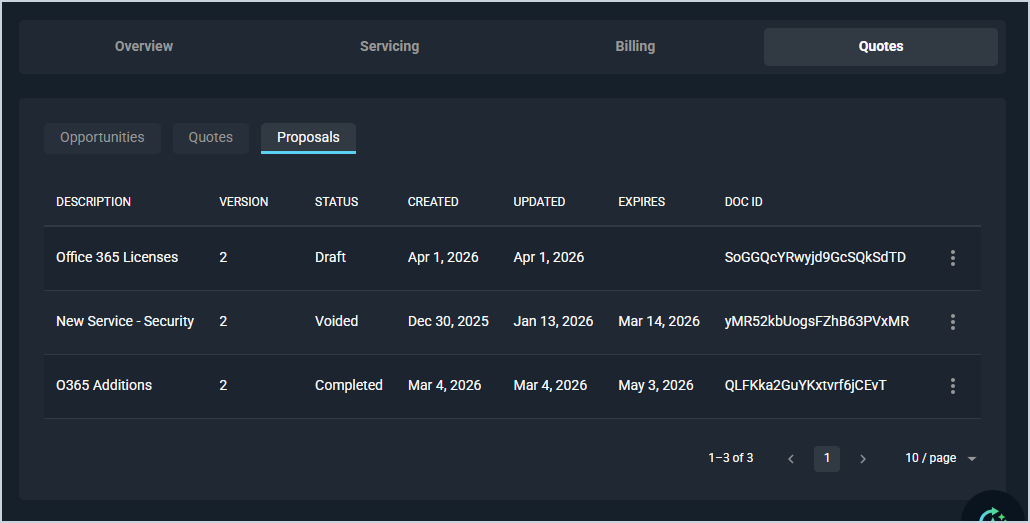
Each field on the Proposals tab is defined below.
| No. | Label | Definition |
| 1 | Description | Description or name of the proposal. |
| 2 | Version | The version number of the proposal document. |
| 3 | Status | The current status of the proposal. Status options include Draft, Completed, and Voided. |
| 4 | Created | The date the proposal was created. |
| 5 | Updated | The date the proposal was last updated. |
| 6 | Expires | The date the proposal expires, if applicable. |
| 7 | Doc ID | The system-generated unique document identifier for the proposal. |
These actions are available on the Proposals tab.
- Sort the results in the table by clicking the column label in the table header.
- Edit a draft proposal by clicking the ellipsis at the end of the row and selecting Edit from the menu options.
- Download the proposal by clicking the ellipsis at the end of the row and selecting Download from the menu options.
- Delete the proposal by clicking the ellipsis at the end of the row and selecting Delete from the menu options.