
System Settings: Inventory
The Inventory category on the System Settings screen allows you to configure settings for inventory management in your instance, including whether the inventory management functionality is enabled, what valuation method you want to use by default, and the current status of your inventory management. Once this category has been completed, you likely won't need to make any changes to this screen unless you have a major change to your business.
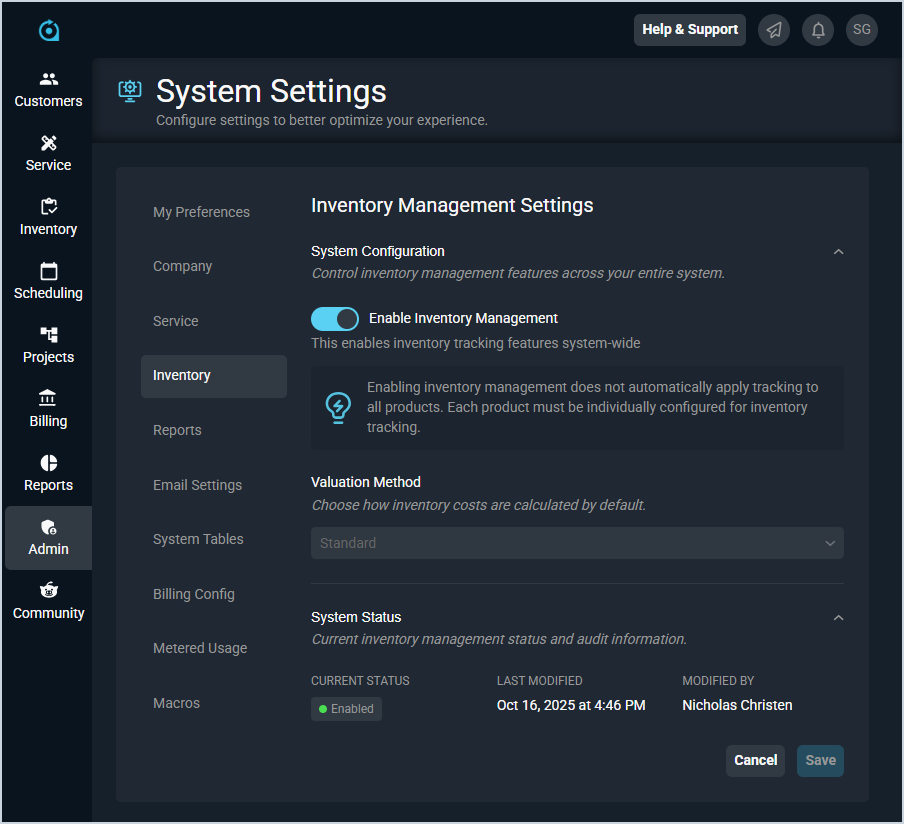
System Configuration
The System Configuration section allows you to enable the Inventory Management feature in your instance and set your default valuation method for inventory costs.
| If the Inventory Management feature is disabled in your instance at any time, all existing purchase orders will function as though Inventory Management had never been enabled. If Inventory Management is re-enabled, any new purchase orders created from that point forward will include inventory-related functionality, including staging and committing receipts. |
Each field in the System Configuration section is defined below.
| No. | Label | Definition |
| 1 | Enable Inventory Management | Click to enable or disable inventory management features in your instance. If this option is not set, you will not see the Inventory Views submenu item, the History submenu item, inventory-related fields on the product or purchase orders, or the Inventory Management tab in the System Tables. |
| 2 | Valuation Method | Default Valuation Method assigned to products created in your database. Valuation Method options include Specific, Average, and Standard. See the Changing Valuation Methods article for more information on the different valuation options available. |
System Status
The System Status section allows you to review the current status of inventory management features in your instance, including the log of the last person to modify the status for these features.
Each field in the System Status section is defined below.
| No. | Label | Definition |
| 1 | Current Status | Status of the inventory management features in your instance. |
| 2 | Last Modified | Date and time the inventory management status was last modified. |
| 3 | Modified By | Name of the rep who last modified the inventory management status. |
Available Actions
These actions are available in the Inventory category.
- Enable or disable inventory management features in your database by checking or unchecking the Enable Inventory Management option and clicking the Save button.
- Change the default valuation for inventory costs in your instance by selecting an option from the Valuation Method dropdown and clicking the Save button. See the Changing Valuation Methods article for more information on the different valuation options available.
- See the System Settings Overview article for more information about the other categories on the System Settings screen.