
Create/Edit Overage Templates
The Edit Overage Template modal allows you to create and update reusable overage pricing structures for use on block hour components. Overage templates can be referenced on agreement templates and individual agreements, allowing consistent overage pricing to be applied and updated from a single place.
To create a new overage template, navigate to Admin > System Settings > Agreements, click the Overage Templates tab, and click New Overage Template. To edit an existing template, click the ellipsis next to the template and select Edit.
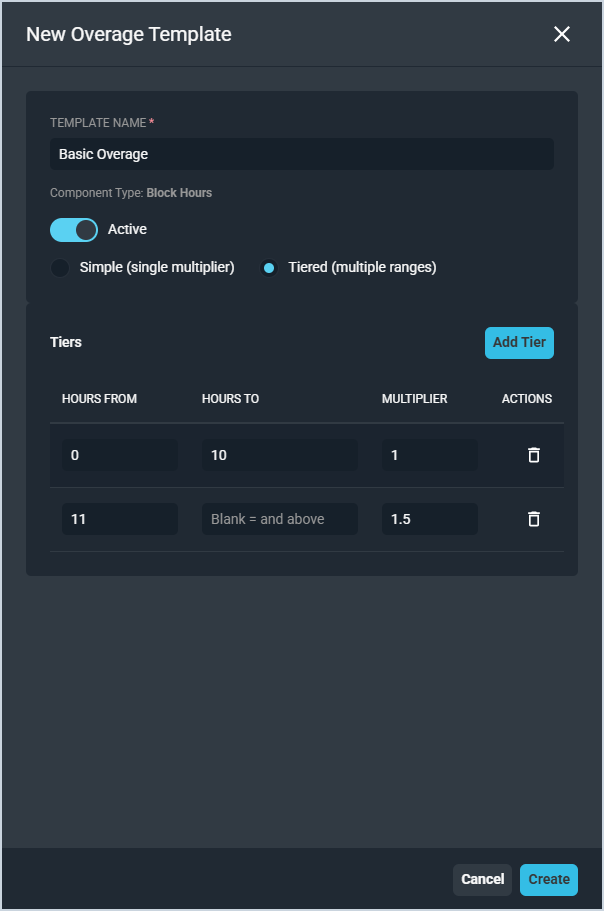
Each field in the overage template modal is defined below.
| No. | Label | Definition |
|---|---|---|
| 1 | Template Name | Name of the overage template. |
| 2 | Active | Indicates whether the template is available for use on components and agreement templates. |
Overage pricing can be configured in one of two structures.
- Simple (single multiplier) - applies a single multiplier to all overage hours regardless of how many hours are used.
- Tiered (multiple ranges) - applies different multipliers based on how many overage hours are used. Click Add Tier to add a tier and enter the Hours From, Hours To, and Multiplier for each range. Leave Hours To blank to indicate that the tier applies to all hours above the Hours From value.
Click Save to save the template or Cancel to discard your changes.