
System Settings: System Tables - Ledger
The Ledger tab in the System Tables category on the System Settings screen allows you to define the GL (General Ledger) codes used for financial tracking and reporting purposes. These codes can be assigned to products in your catalog to support accounting and reporting workflows.
GL Codes
The GL Codes section allows you to define and manage the general ledger codes available for assignment throughout your instance.
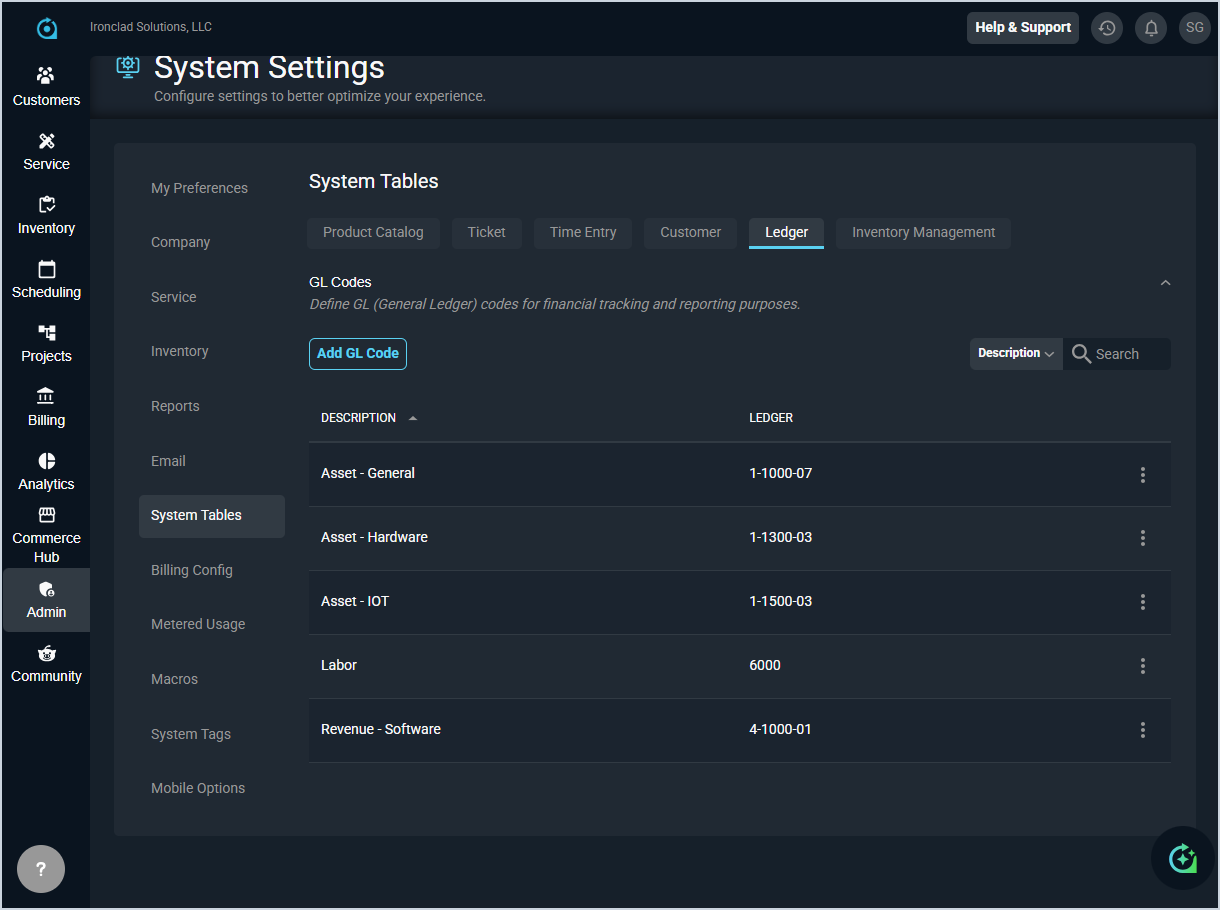
| No. | Label | Definition |
| 1 | Description | Name or description of the GL code. |
| 2 | Ledger | The GL code or account number used for financial tracking and reporting. |
These actions are available on the Ledger tab.
- Add a new GL code by clicking the Add GL Code button, completing the desired fields, and clicking Save.
- Search the GL codes displayed in this section by selecting a column from the dropdown and entering text in the Search field.
- Edit a GL code by clicking the ellipsis at the end of the row and selecting Edit from the menu options.
- Delete a GL code by clicking the ellipsis at the end of the row and selecting Delete from the menu options. NOTE: You cannot delete a GL code if it is currently in use in your instance.
- See the System Settings Overview article for more information about the other categories on the System Settings screen.