
View Audit Log Details
The Audit Log Details screens allows you to review information for a specific activity item listed on the Audit Log screen. It provides additional context, helping you better understand what occurred. The length of the Description shown varies based on the Event type for the activity item.
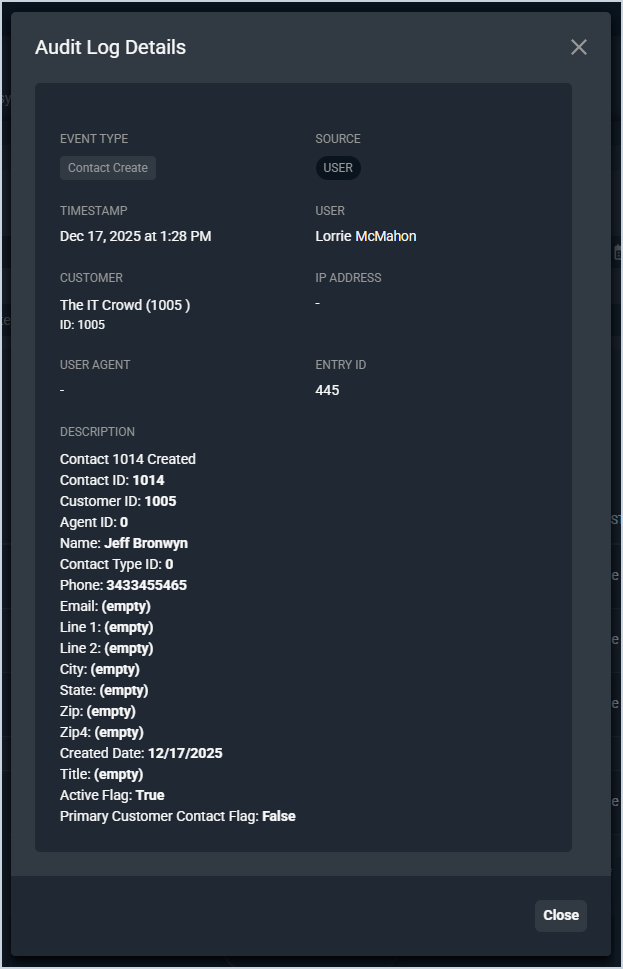
Each field on the Audit Log Details screen is defined below.
| No. | Label | Definition |
| 1 | Timestamp | Date and time for the activity. |
| 2 | User | Name of the user who initiated the activity. |
| 3 | Customer | Name and numerical identifier for the customer the activity was initiated for, if applicable. |
| 4 | IP Address | This field is not currently available. |
| 5 | User Agent | This field is not currently available. |
| 6 | Entry ID | Numerical identifier for the activity. |
| 7 | Description | Description for the activity. Typically, the description displays a brief description of the activity and/or a list of fields that were updated for the record. |
The following actions are available on the Audit Log Details screen.
- Return to the Audit Log screen by clicking the X icon at the top of the modal. See the Audit Logs: Overview article for more information.