
Ticket Details: Purchase Orders Tab
The Purchase Orders tab on the Ticket Details screen contains a list of all purchase orders associated with that ticket in a single view. From this tab, you can review and edit linked purchase orders, making it easy to manage ordering activity related to the ticket without leaving the ticket record.
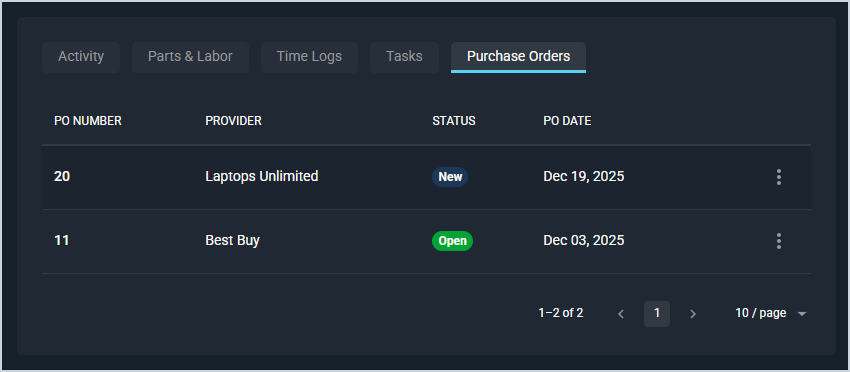
Each field on the Purchase Orders tab is defined below.
| No. | Label | Definition |
| 1 | PO Number | Numerical identifier for the purchase order. |
| 2 | Provider | Name of the provider on the purchase order. |
| 3 | Status | Status of the purchase order. |
| 4 | PO Date | Date the purchase order was created. |
These actions are available on the Purchase Orders tab.
- Edit the purchase order by clicking the ellipsis at the end of the row and selecting Edit from the menu options. See the Create/Edit Purchase Orders article for more information.
Areas on the Ticket Details Screen
For information on other areas of the Ticket Details screen, see the related articles.