
View Serial Number Details: Inventory & Product Details
Clicking on a result from the Serial Number Lookup screen or the Serial Numbers tab on the Inventory Management screen opens the serial number detail view. The Inventory & Product Details tab is the default view and displays the current inventory status and product information for the selected item.
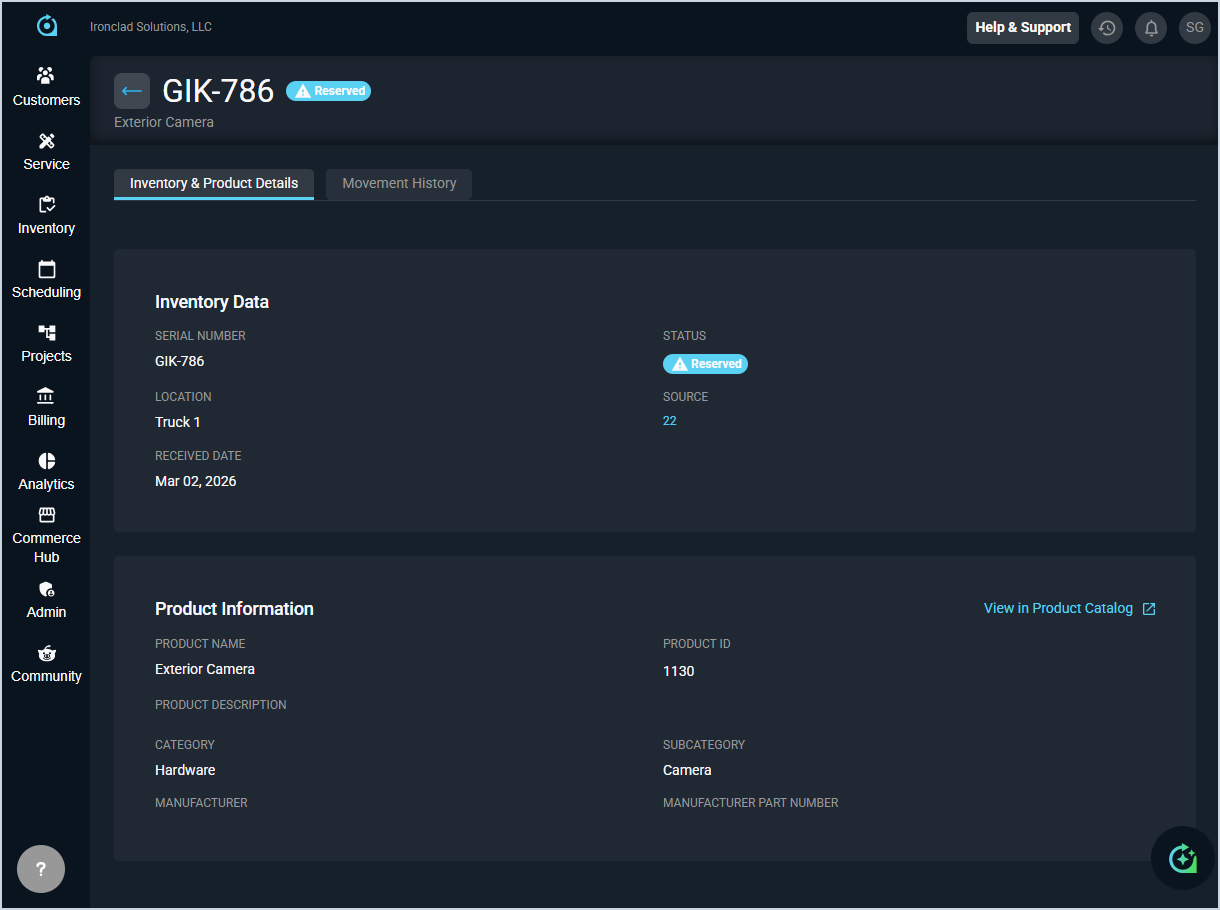
Each field on the Inventory & Product Details tab is defined below.
| No. | Label | Definition |
| 1 | Serial Number | The serial number of the item. |
| 2 | Status | The current status of the item. Status options include Available and Reserved. |
| 3 | Product Name | The name of the product associated with the serial number. |
| Inventory Data | ||
| 4 | Serial Number | The serial number of the item. |
| 5 | Status | The current status of the item. Status options include Available and Reserved. |
| 6 | Location | The current location of the item, such as a warehouse or vehicle. |
| 7 | Source | The purchase order the item was received from. Click the link to view the purchase order details. |
| 8 | Received Date | The date the item was received into inventory. |
| Product Information | ||
| 9 | Product Name | The name of the product associated with the serial number. |
| 10 | Product ID | The unique identifier for the product in your system. |
| 11 | Product Description | The description of the product, if applicable. |
| 12 | Category | The category assigned to the product. |
| 13 | Subcategory | The subcategory assigned to the product. |
| 14 | Manufacturer | The manufacturer of the product, if applicable. |
| 15 | Manufacturer Part Number | The manufacturer part number for the product, if applicable. |
The following actions are available on the Inventory & Product Details tab.
- Return to the Serial Numbers tab on the Inventory Management screen by clicking the back arrow at the top of the screen.
- View the complete movement history for the item by clicking the Movement History tab. See the View Serial Number Details: Movement History article for more information.
- View the purchase order associated with the item by clicking the source link in the Inventory Data section.
- View the full product record in the Product Catalog by clicking View in Product Catalog in the Product Information section.