
System Settings: System Tables - Number Management
The System Tables category on the System Settings screen allows you to configure various data points that can be selected using dropdown menus throughout your database. The Number Management tab controls the reasons a telephone number can be marked unavailable and how long the number is held in quarantine after removing it from a service. To open it, click Admin in the sidebar menu, select System Settings, click System Tables, and then click the Number Management tab.
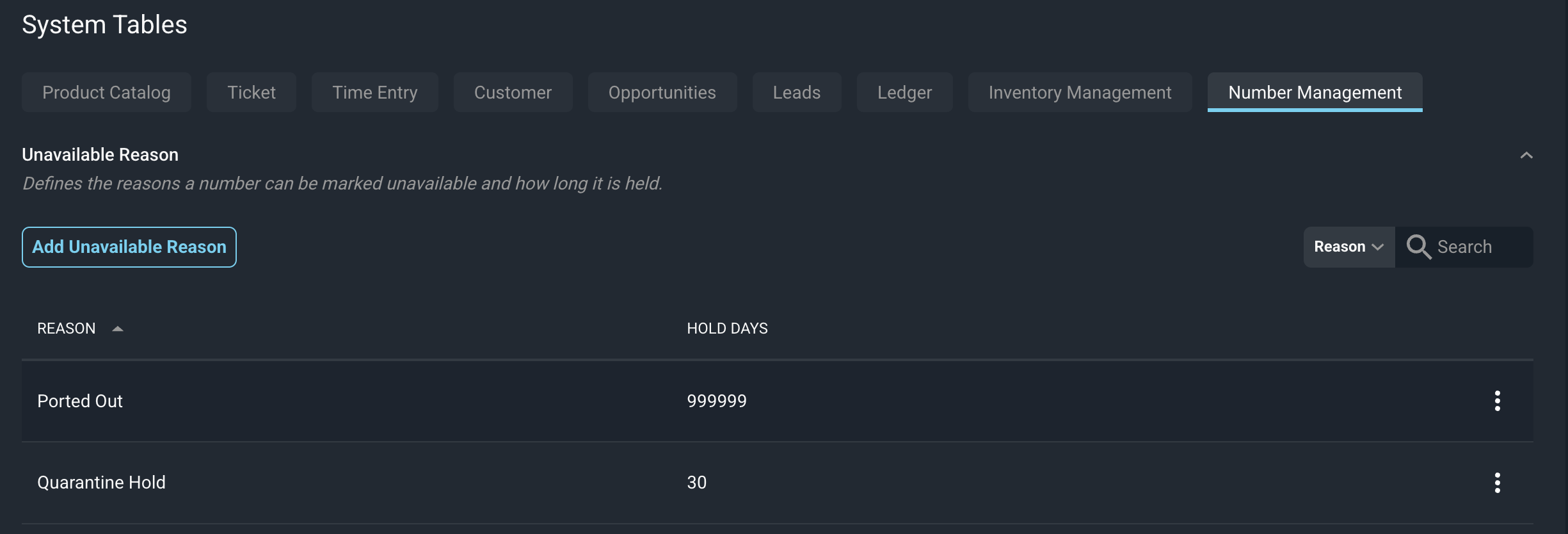
Each column in the Unavailable Reason section is defined below.
No. | Label | Definition |
|---|---|---|
1 | Reason | The name of the reason a number can be marked unavailable, such as Quarantine Hold or Ported Out. This reason can be selected when removing numbers from recurring services. |
2 | Hold Days | The number of days a number is held after it is marked unavailable for this reason. This is considered a quarantine period so if you remove a number from one customer's account, there is typically a hold period before you can re-assign that number to a new customer account. The number will not show as available until that hold period has passed in order to prevent assigning the number before the quarantine period is up. |
These actions are available on the Number Management tab.
- Add a new reason by clicking the Add Unavailable Reason button, completing the fields, and saving.
- Search the reasons by selecting a column from the dropdown next to the Search box (set to Reason by default) and entering text.
- Sort the reasons by clicking the column label in the table header.
- Edit a reason by clicking the three-dot menu at the end of its row and selecting Edit.
- Delete a reason by clicking the three-dot menu at the end of its row and selecting Delete.
See the System Settings: Overview article for more information about the other categories on the System Settings screen.
Related Articles
- Number Management: Overview
- Number Management: Group Details
- Assiging Telephone Numbers to Recurring Services
- System Settings: System Tables - Overview
- System Settings: System Tables - Inventory Management