Transferring Tickets to Different Customers
Rev.io allows you to transfer an existing ticket from one customer account to another, providing greater flexibility when managing ticket ownership. This process ensures that all history, activity, and related information remain intact when the ticket is transferred to the appropriate customer.
| NOTE: Transferring tickets requires the ‘Can transfer a ticket’ permission. |
Transferring Tickets
Any tickets in an open, unbilled Status can be transferred from one customer to another from the ticket stage side panel. In the customer information section, click the Transfer button to start the transfer process for the ticket.
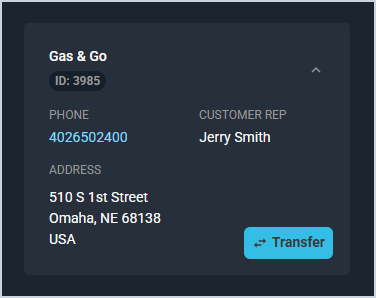
| NOTE: The Transfer button is unavailable for tickets that have been invoiced. If the invoice is reversed, the button becomes available again. |
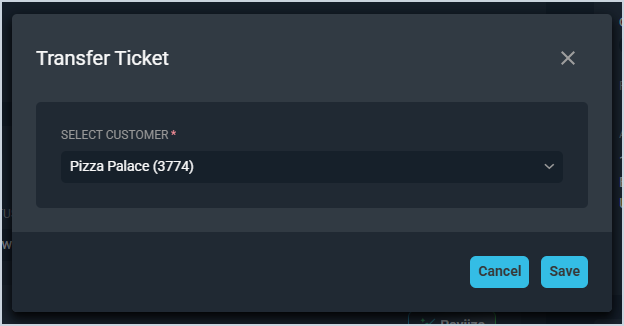
Once you click the Transfer button, the Transfer Ticket window displays. From here, simply select the customer account where you'd like to transfer the ticket from the Select Customer dropdown and click the Save button. The ticket transfers to the new customer and the screen automatically refreshes, showing the newly selected customer's information in the stage side panel.
Viewing Whether Tickets Have Been Transferred
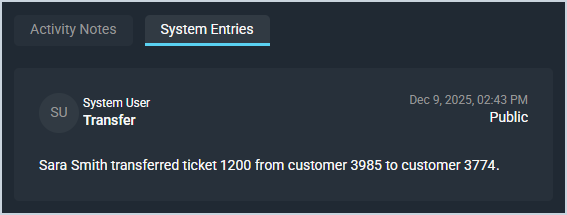
If the ticket has been transferred from one customer to another, the System Entries section on the ticket's Activity tab displays a log of the action. This entry includes the name of the rep who transferred the ticket, the original customer on the ticket, and the new customer on the ticket. If the ticket has been transferred multiple times, there will be a log in the System Entries section for each transfer.