
Global Search
The global search bar at the top of every screen in Rev.io allows you to search across customers and tickets from a single location. Search supports natural-language queries with smart result ranking, enhanced typo tolerance, and fuzzy matching, so you can find records even when you don't know the exact name or ID. Click the search bar or press Ctrl + K to open the search panel. NOTE: Search data covers the last 2 years.
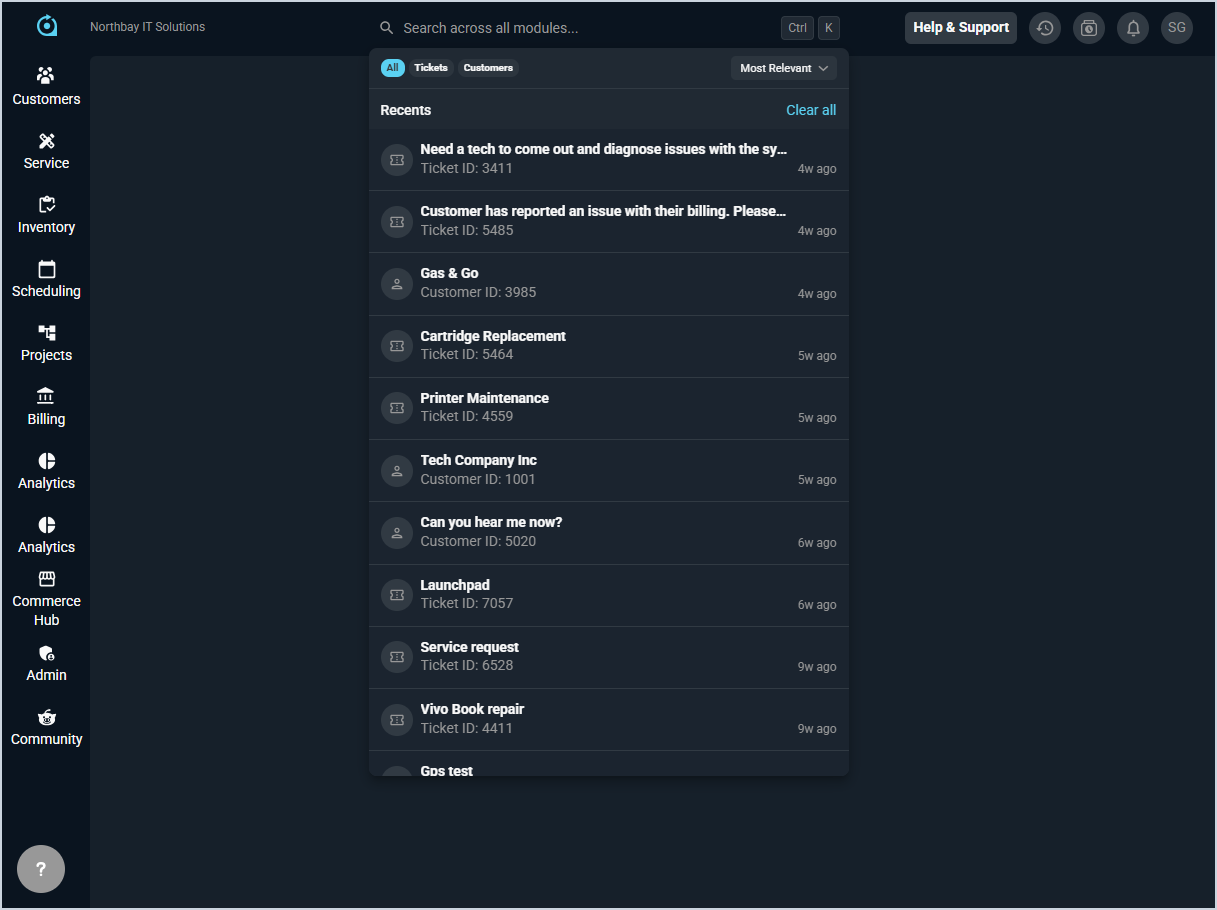
Searching
Type your query into the search bar to see results across customers and tickets. Results appear as you type and are ranked by relevance by default. Clicking any result takes you directly to the matching record.
Filtering and Sorting Results
The following actions are available in the search panel.
- Filter results to show all records, tickets only, or customers only by clicking the All, Tickets, or Customers filter tabs at the top of the panel.
- Sort results by clicking the Most Relevant dropdown and selecting your preferred sort order. Sort options include Most Relevant, Newest, Oldest, and Last Modified.
- Clear your recent searches by clicking Clear All in the Recents section.
Searchable Fields
The following fields are searchable for each record type.
Customers:
- Customer Name
- Customer ID
- Account Number
- Customer Type
- Class
- Status
- Parent Company
- Service Address
- Agent
- Bill Profile
Tickets:
- Description
- Ticket ID
- Customer Name
- Type
- Status
- State
- Priority
- Severity
- Created By