Add/Edit Support Inboxes

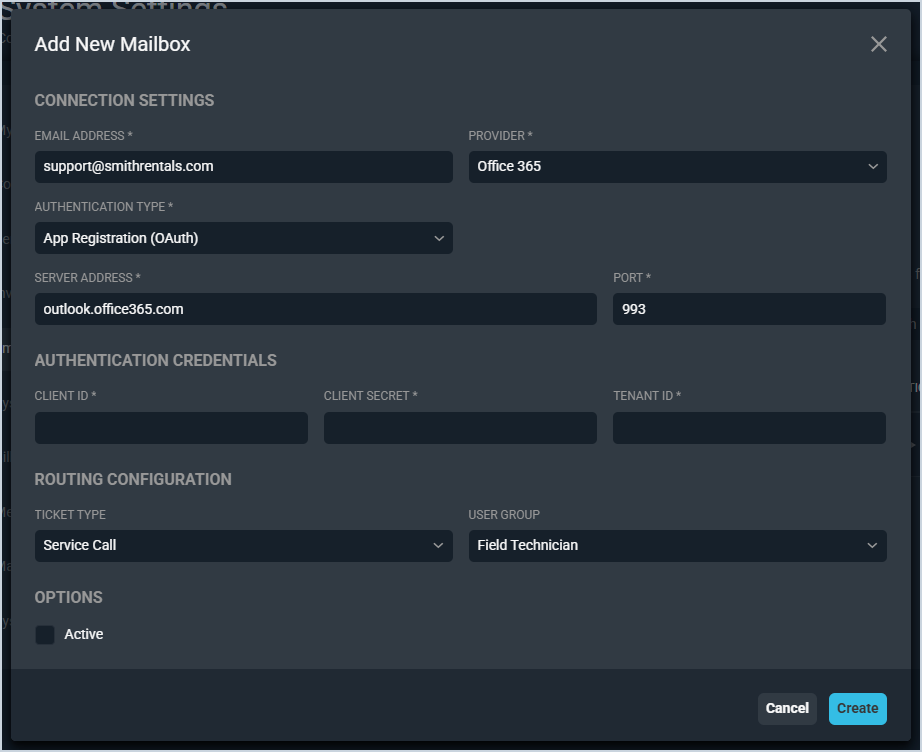
The Add New Mailbox and Edit Mailbox screens allow you to configure inbound support mailboxes for your Rev.io instance. Each mailbox connects to a monitored email address and can be set up with routing rules that control how tickets are created from incoming emails. To add a new mailbox, click the + Add Mailbox button from the Support Inboxes tab in the Email category on the System Settings screen.

Each field on the Add New Mailbox screen is defined below.

No.LabelDefinition
Connection Settings
1Email AddressThe email address for the mailbox you want to monitor for incoming ticket creation.
2ProviderThe email provider for the mailbox. Provider options include Office 365 and Gmail.
3Authentication TypeThe authentication method used to connect to the mailbox. App Registration (OAuth) is currently the only option.
4Server AddressThe server address for the email provider.
5PortThe port number used to connect to the email server.
Authentication Credentials
6Client IDThe client ID used to authenticate the connection to the mailbox.
7Client SecretThe client secret used to authenticate the connection to the mailbox.
8Tenant IDThe tenant ID associated with your email provider account.
Routing Configuration
9Ticket TypeThe ticket type to assign to tickets created from emails received by this mailbox.
10User GroupThe user group to assign to tickets created from emails received by this mailbox.
Options
11ActiveCheck this option to activate the mailbox and begin monitoring it for incoming emails.

Was this article helpful?