
View Agreement: Components Tab
The Components tab on the agreement details screen displays the active components that make up the agreement, including their current rates, included hours, usage, and overage pricing. Each component is displayed with its name, component type badge, and the services it applies to.
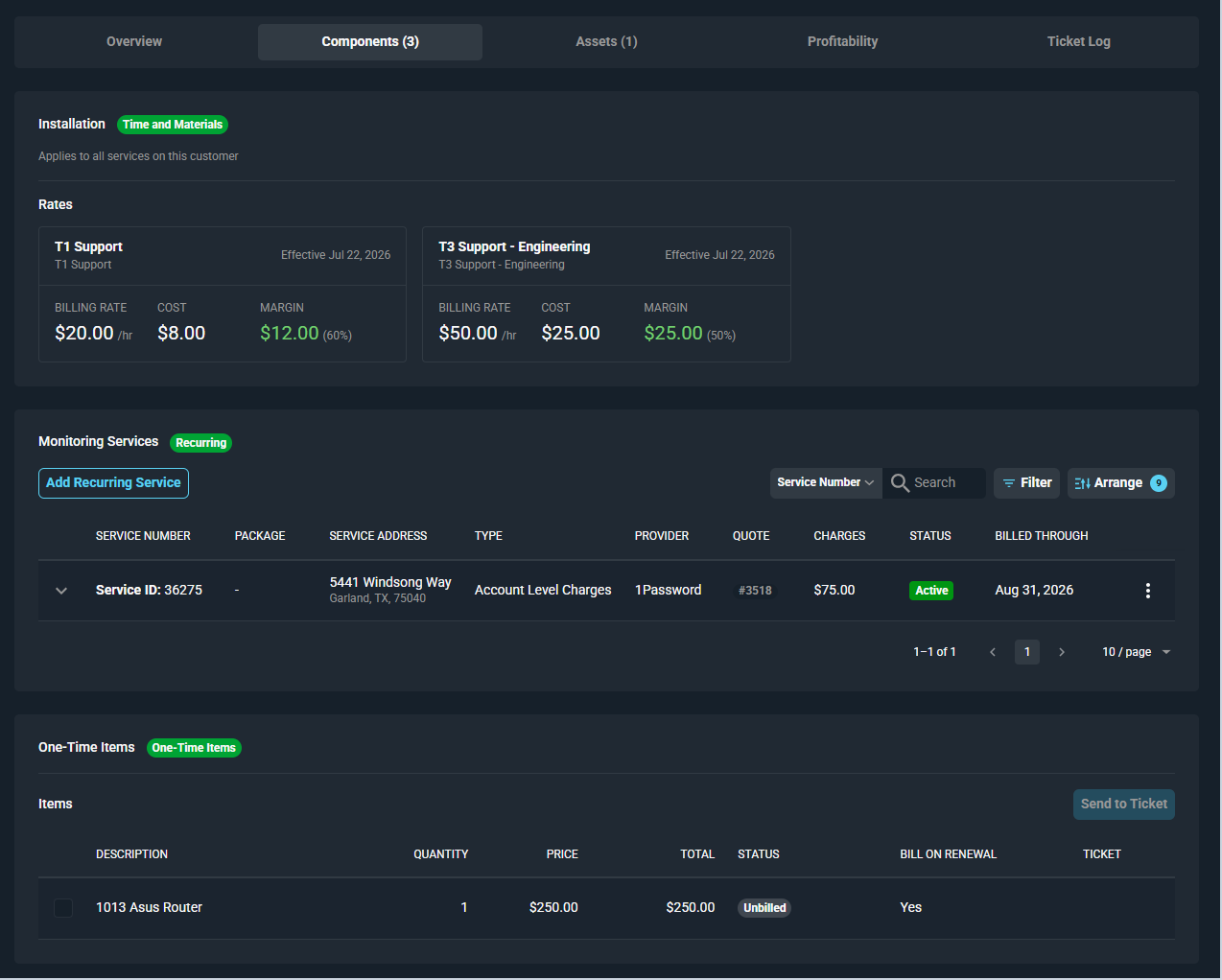
Time and Materials Components
For Time and Materials components, the Rates section displays a card for each rate configured on the component. Each rate card displays the following.
| Label | Definition |
|---|---|
| Rate Name | Name of the rate and the time log reason it applies to. |
| Effective Date | Date from which the rate is effective. |
| Billing Rate | Rate billed to the customer per hour. |
| Cost | Internal cost per hour. |
| Margin | Margin per hour and margin percentage. |
Block Hours Components
For Block Hours components, the following details are displayed for each block hour rate.
| Label | Definition |
|---|---|
| Billing Rate | Rate billed to the customer per hour. |
| Cost | Internal cost per hour. |
| Margin | Margin per hour and margin percentage. |
| Included | Total number of hours included in the block. |
| Current Period Usage | Progress bar showing hours used versus hours included in the current period, with remaining hours displayed below. |
| Overage Pricing | Overage tiers that apply beyond the included hours, showing hours range, multiplier, and overage rate per hour. |
Recurring Components
For Recurring components, the following details are displayed for each associated recurring service.
| Label | Definition |
|---|---|
| Service Number | The service number associated with the recurring charge. |
| Package | Package associated with the service, if applicable. |
| Service Address | Address associated with the service. |
| Type | Type of the recurring service. |
| Provider | Provider associated with the service. |
| Quote | Quote associated with the service, if applicable. |
| Charges | Total charges for the service. |
| Status | Current status of the service. |
| Billed Through | Date through which the service has been billed. |
Click Add Recurring Service to associate a recurring service with the component.
One-Time Items Components
For One-Time Items components, the Items section displays each item configured on the component. Each item displays the following.
| Label | Definition |
|---|---|
| Description | Description of the item. |
| Quantity | Quantity of the item. |
| Price | Price of the item. |
| Total | Total price for the quantity of the item. |
| Status | Billing status of the item, such as Unbilled. |
| Bill on Renewal | Indicates whether the item is billed again at each renewal. |
| Ticket | Ticket the item has been sent to, if applicable. |
Click Send to Ticket to send selected items to a ticket.
For information on other areas of the agreement details screen, see the following articles.