
Create/Edit Workflow Actions
Workflow actions are reusable templates that define a single unit of work to be completed as part of a flow, such as calling a customer, scheduling an on-site visit, or sending a follow-up. Actions are created once in the Action Library and can be added to as many flows as needed. When a flow is assigned to a ticket and a phase is launched, the actions in that phase are automatically created as tasks on the ticket based on the configuration defined here.
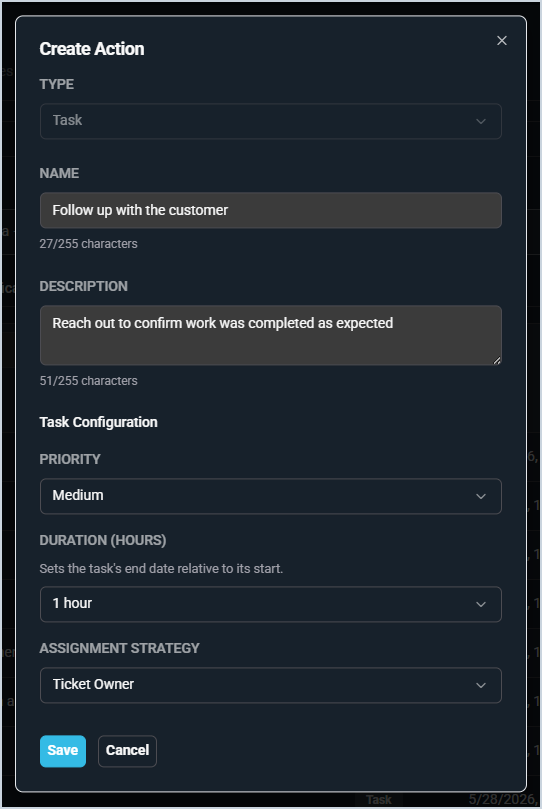
Each field on the Create/Edit Action form is defined below.
| No. | Label | Definition |
| 1 | Type | Type of action. Currently, Task is the only available action type. |
| 2 | Name | Name of the action as it will appear in the Action Library and when building flows, for example, "Call the Customer" or "Follow Up with the Customer." |
| 3 | Description | Description of the action that provides additional context for the person completing it. |
| Task Configuration | ||
| 4 | Priority | Priority level assigned to the task when the action is triggered on a ticket. |
| 5 | Duration (Hours) | Estimated time allotted to complete the task. Sets the task's end date relative to its start date. Duration options include 1 hour, 4 hours, 1 day, 2 days, 1 week, and custom. |
| 6 | Assignment Strategy | Determines who the task is assigned to when the action is triggered. Assignment strategy options include Unassigned, Specific User, Specific Group, and Ticket Owner. NOTE: If you select the Specific User or Specific Group options, an additional field displays, allowing you to select the user/group. |