
Add/Edit Agreement Time Entry Rates
The Edit Time Entry Rate modal allows you to update the billing rate and cost for a time log reason as it applies to agreements. Changes to a time entry rate can be pushed to linked agreement templates and direct agreements, with the exception of locked agreements.
Time entry rates cannot be created from this screen. To add a new time log reason, navigate to System Tables > Time Entry. See the System Settings: System Tables - Time Entry article for more information. To edit a time entry rate, navigate to Admin > System Settings > Agreements, click the Time Entry Rates tab, click the time log reason, and select Edit.
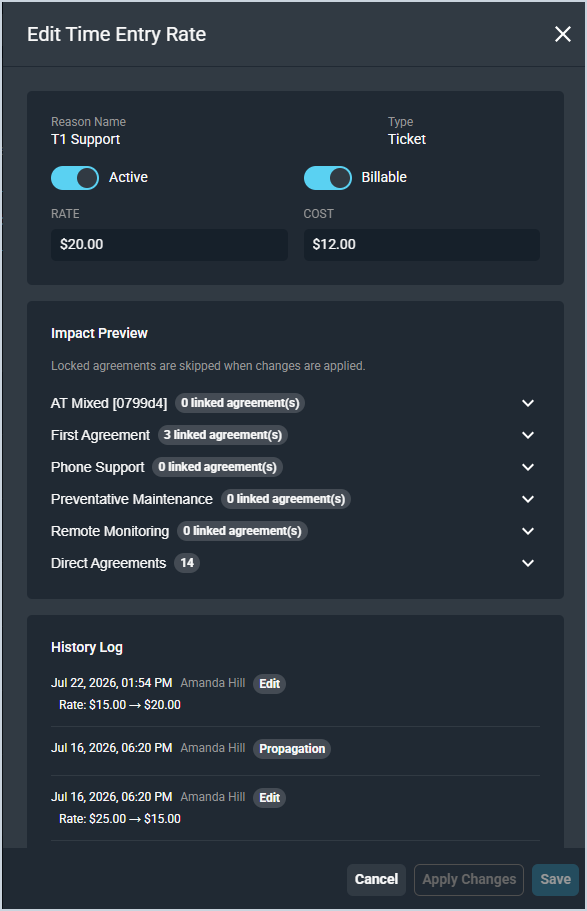
Each field in the Edit Time Entry Rate modal is defined below.
| No. | Label | Definition |
|---|---|---|
| 1 | Reason Name | Name of the time log reason. Read-only. |
| 2 | Type | Type of the time log reason. Read-only. |
| 3 | Active | Indicates whether the time log reason is active. |
| 4 | Billable | Indicates whether time logged with this reason is billable. |
| 5 | Rate | Billing rate to apply for agreement-covered time logged with this reason. |
| 6 | Cost | Cost rate to apply for agreement-covered time logged with this reason. |
Impact Preview
The Impact Preview section displays which agreement templates and direct agreements will be affected when changes are applied. Locked agreements are skipped when changes are applied. Expand each row to see the linked agreements within that template or group.
History Log
The History Log section displays a record of all previous changes made to the time entry rate, including the date, the user who made the change, and the previous and updated rate and cost values.
Click Apply Changes to push the updated rate to all linked agreement templates and agreements, Save to save the rate without pushing changes, or Cancel to discard your changes.