
Contact Profile
The Contact Profile screen contains relevant details for the selected contact. Fields shown in the profile can vary based on the data entered on contact creation or over time. If a field is left blank while editing the contact profile, it will not appear in the contact profile. When you create a new Residential customer, the information entered for the customer is used to create a primary contact record on the customer account.
Information for the customer associated with the contact displays in the customer information section.
| Contacts can be managed in both Rev.io Billing and Rev.io PSA. See the Managing Contacts in Rev.io Billing for Use in Rev.io PSA article for more information. |
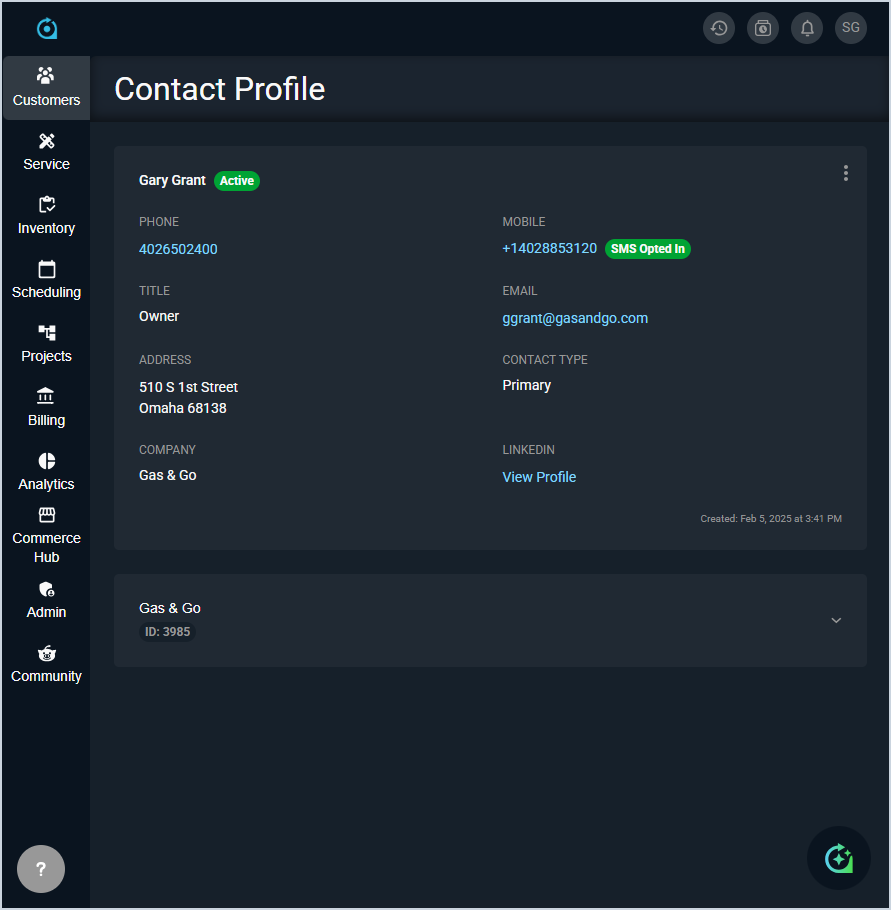
Each field on the contact profile is defined below.
| No. | Label | Definition | |
| 1 | <Name> | Name of the contact. | |
| 2 | <Status> | Status of the contact record. Status options are Active or Inactive. When the status is Active, a green circle displays. When the status is Inactive, a red circle displays.
| |
| 3 | Phone | Phone number for the contact. | |
| 4 | Mobile | Mobile number for the contact. | |
| 5 | <SMS Opt-In> | The SMS Opted In chip displays if the contact is opted in to receive SMS notifications from the system. | |
| 6 | Title | Title for the contact's role within their organization. | |
| 7 | Email address for the contact. | ||
| 8 | Address | Address for the contact. | |
| 9 | Contact Type | Type for the contact. Contact types can be defined on the Customer tab in the System Tables category on the System Settings screen. See the System Settings: System Tables - Customer article for more information. | |
| 10 | Company | Name of the company associated with the contact. | |
| 11 | Link to the contact's LinkedIn profile. When populated, if the Subscribe to LinkedIn Company Updates option is checked in the Company category on the System Settings screen, you will receive notifications when the contact has a job status change. | ||
| 12 | Created | Date and time the contact record was created. This field exists only in PSA. |
These actions are available on the Contact Profile.
- Edit the contact by clicking the ellipsis and selecting Edit from the menu. See the Add/Edit Contacts article for more information.
- Change the Status for a contact by clicking the ellipsis and selecting Set Active or Set Inactive from the menu.