
View Serial Number Details: Movement History
The Movement History tab on the serial number detail view displays a chronological log of every movement event recorded for the selected item. This tab gives you a complete audit trail of where the item has been and how it has moved through your inventory.
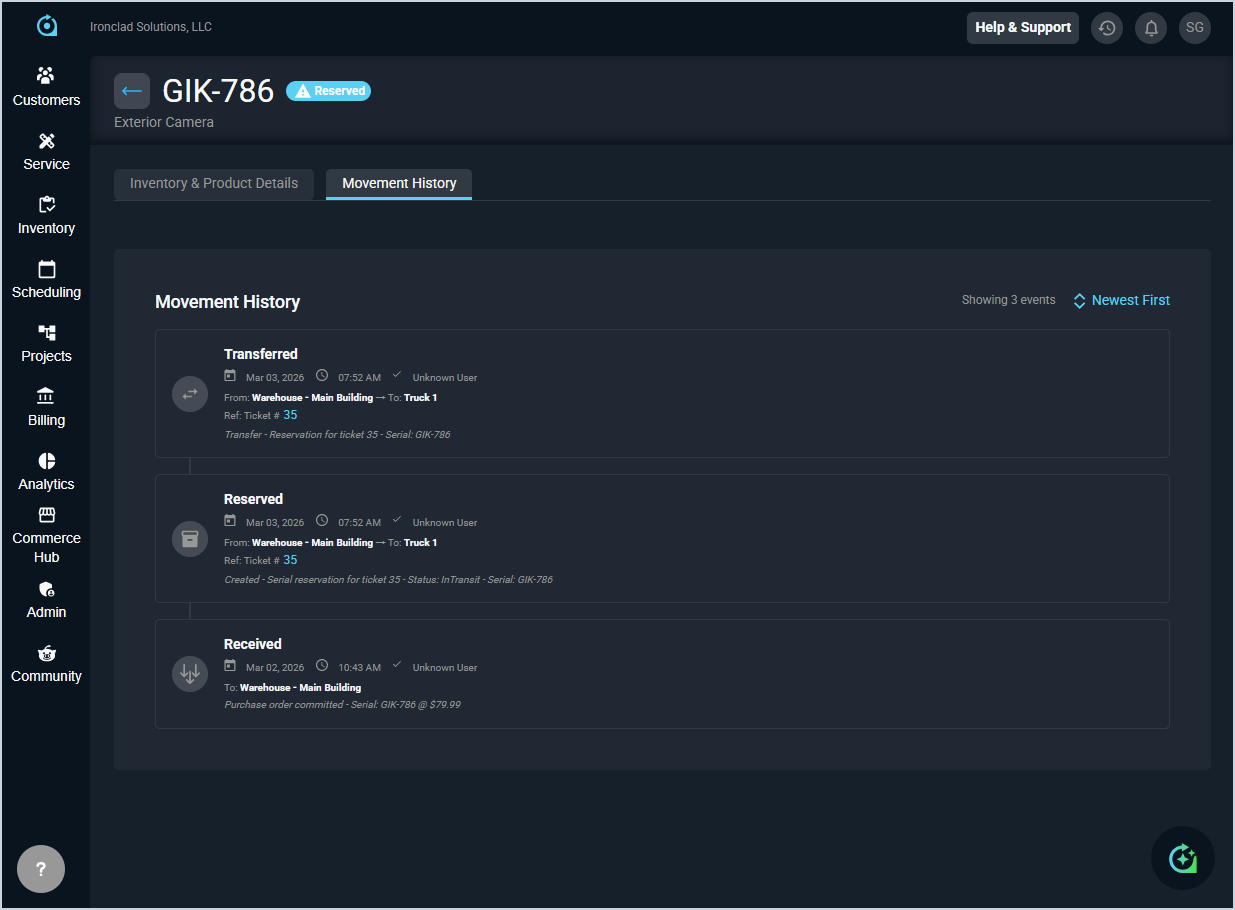
Each field in the Movement History tab is defined below.
| No. | Label | Definition |
| 1 | <Movement> | The type of movement event. Event types include Received, Reserved, and Transferred. |
| 2 | Date | The date the movement event occurred. |
| 3 | Time | The time the movement event occurred. |
| 4 | User | The user who performed the action associated with the movement event. |
| 5 | From | The location the item was moved from. |
| 6 | To | The location the item was moved to. |
| 7 | Ref Ticket | The ticket associated with the movement event, if applicable. Click the link to view the ticket details. |
| 8 | <Description> | A brief description of the movement event, including relevant details such as the serial number and status. |
The following actions are available on the Movement History tab.
- Return to the Serial Numbers tab on the Inventory Management screen by clicking the back arrow at the top of the screen.
- Toggle the sort order of the movement history by clicking Newest First/Oldest First.
- View a ticket associated with a movement event by clicking the ticket number link in the Ref Ticket field.
- View inventory and product details for the item by clicking the Inventory & Product Details tab. See the View Serial Number Details: Inventory & Product Details article for more information.