
View Agreement: Profitability Tab
The Profitability tab on the agreement details screen displays financial performance data for the agreement for the current period, including margin and utilization broken down by component.
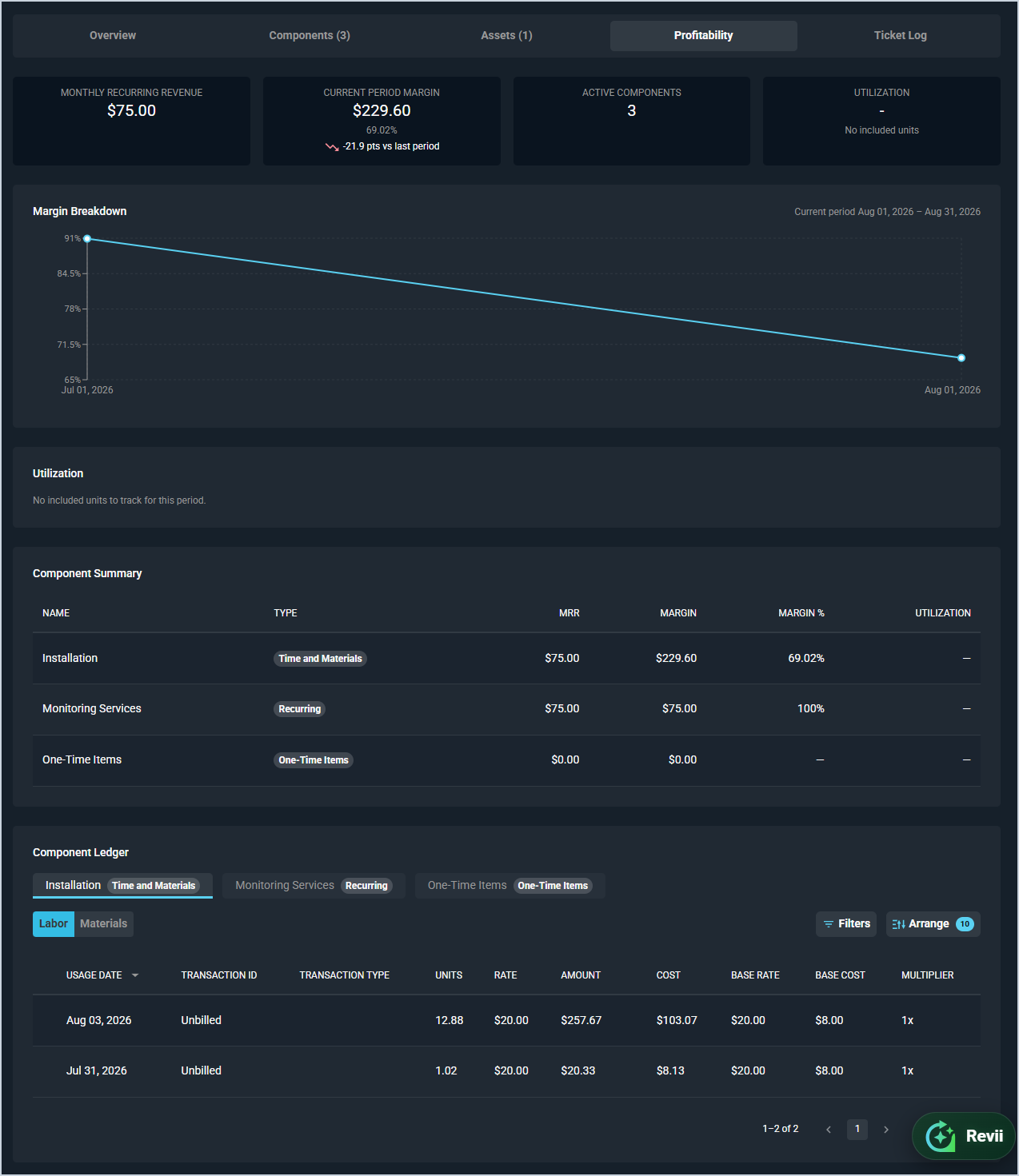
The following summary metrics display at the top of the screen across all tabs.
| Metric | Definition |
|---|---|
| Monthly Recurring Revenue | Total monthly recurring revenue generated by the agreement's active components. |
| Current Period Margin | Margin for the current billing period across all active components, including the margin percentage and change versus the prior period. |
| Active Components | Number of currently active components on the agreement. |
| Utilization | Percentage of included hours used across all block hour pools on the agreement. |
Margin Breakdown
The Margin Breakdown section displays a line chart of margin percentages over the current period. The current period date range is shown in the upper right of the section.
Utilization
The Utilization section displays a progress bar for each block hour pool on the agreement showing the hours used versus the total included hours for the current period. Each bar is labeled with the time log reason rate and displays the number of hours used, total included hours, and utilization percentage. If no block hour components are active, this section indicates that there are no included units to track for the period.
Component Summary
The Component Summary section displays a breakdown of performance by component. Each row includes the following fields.
| Label | Definition |
|---|---|
| Name | Name of the component. |
| Type | Component type badge. |
| MRR | Monthly recurring revenue for the component. |
| Margin | Margin for the component in the current period. |
| Margin % | Margin percentage for the component in the current period. |
| Utilization | Percentage of included hours used for the component in the current period. |
Component Ledger
The Component Ledger section displays a detailed transaction log for each component. Click a component tab to view its ledger. For Time and Materials and Block Hours components, toggle between Labor and Materials to view the relevant transactions. Each transaction row includes the following fields.
| Label | Definition |
|---|---|
| Usage Date | Date the usage was recorded. |
| Transaction ID | Identifier for the transaction, or Unbilled if not yet invoiced. |
| Transaction Type | Type of transaction. |
| Units | Number of units or hours for the transaction. |
| Rate | Rate applied to the transaction. |
| Amount | Total amount for the transaction. |
| Cost | Total cost for the transaction. |
| Base Rate | Base rate before any multiplier is applied. |
| Base Cost | Base cost before any multiplier is applied. |
| Multiplier | Overage multiplier applied to the transaction, if applicable. |
The following actions are available on the Component Ledger.
- Filter the ledger by clicking the Filters button.
- Customize which columns display by clicking the Arrange button. See the Arrange Columns article for more information.
For information on other areas of the agreement details screen, see the following articles.