
Help & Support
Submit a Request In-App
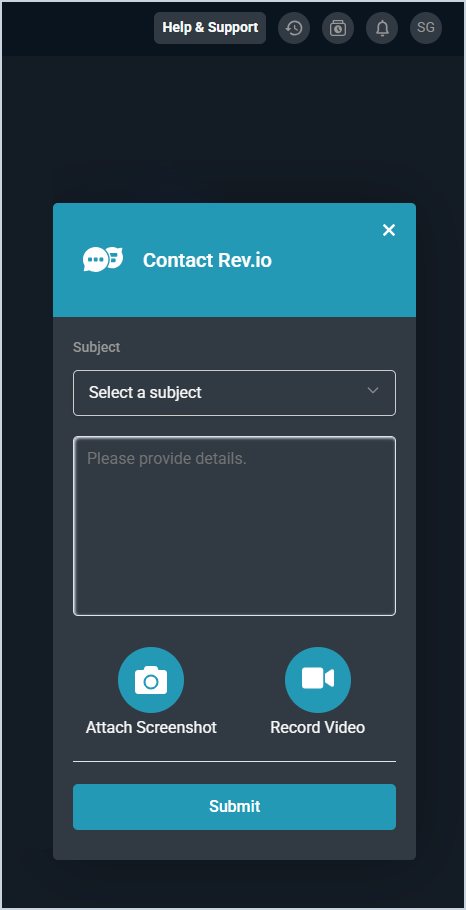
To submit a request or feedback from within Rev.io, click Help & Support in the top toolbar to open the Contact Rev.io window. Select a Subject, enter details about your request, and click Submit. You can also attach a screenshot by clicking Attach Screenshot or record a short video of your screen by clicking Record Video.
Contact the Client Success Team
The Rev.io Client Success team is available Monday through Friday, 8:30 AM to 6:30 PM EST.
Phone: 1.866.470.5502, Option 1
After-Hours Emergency Support
An after-hours emergency occurs when a critical service goes down outside of regular business hours, causing disruptions to business operations that cannot be resolved without immediate attention. Examples of critical services include being unable to access the login page or when endpoints are completely down, preventing users from accessing essential systems or data.
If you are experiencing a critical issue outside of regular business hours that significantly impacts business functions and cannot be deferred until the next business day, contact the on-call support team using the information below.
| IMPORTANT: The contact information below is for after-hours emergency use only. For day-to-day support, contact the Client Success team by phone during regular business hours or submit a ticket any time of day. |
| First Point of Contact | Technical Point of Contact |
| Will Steiner, VP of Client Success Call or text: 404.825.4292 Email: wills@rev.io | Ray Bargas, Chief Technology Officer Call or text: 817.739.2590 Email: ray.bargas@rev.io |