
Dispatch Board: Overview
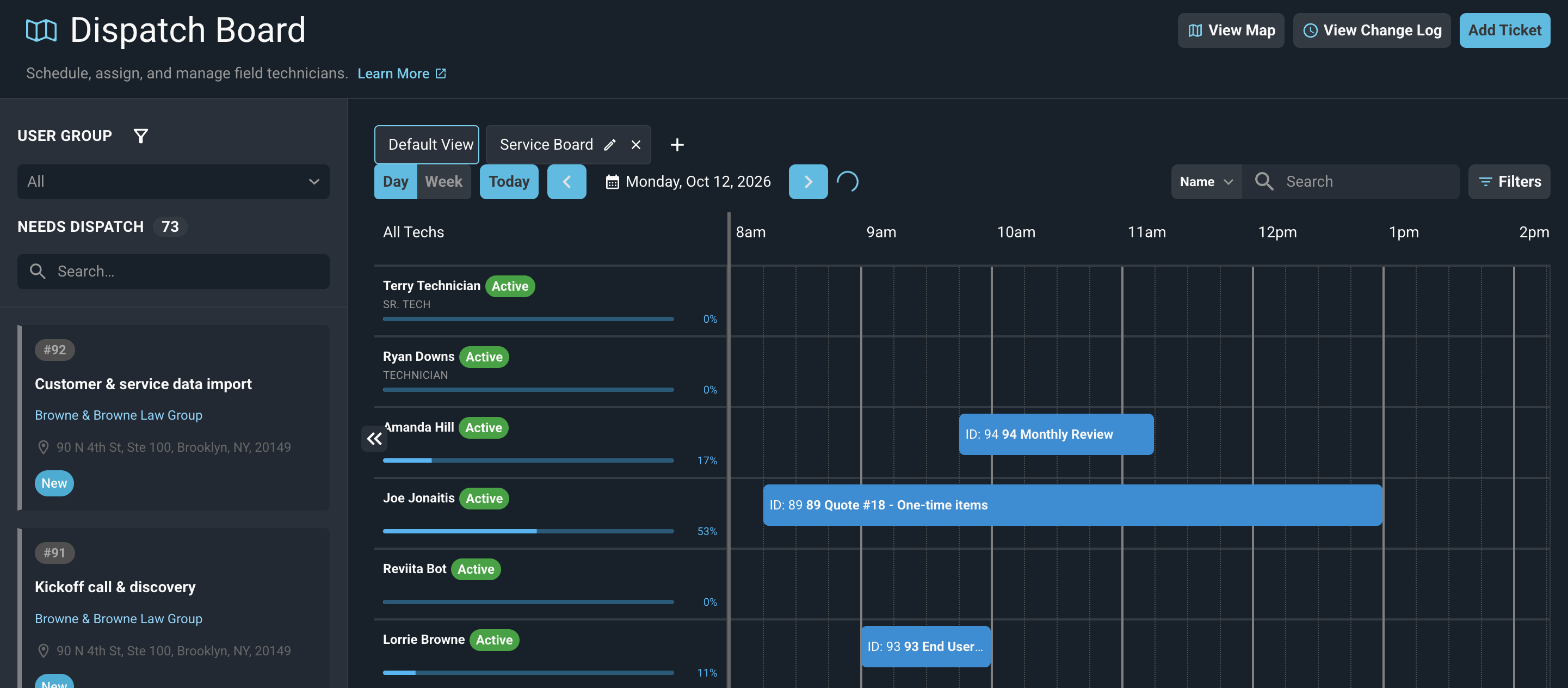
The Dispatch Board gives you a single access point to manage ticket requests and efficiently dispatch service technicians. The screen is divided into two main sections: the ticket panel on the left and the timeline on the right. These areas allow you to view unassigned tickets while simultaneously viewing your technicians' schedules to confirm their availability. Tickets can be dispatched by dragging them from the ticket panel directly onto a technician's time slot in the timeline, which opens the dispatch window to confirm the assignment.
Tabs across the top of the timeline let you switch between the Default View and ticket boards that you have added. Each tab shows the tickets from its board and the technicians from the user groups you selected. See the Dispatch Board: Ticket Board Tabs article for more information.
The following actions are available from the Dispatch Board header.
- View the location of unassigned tickets and technicians on a map by clicking View Map.
- View a log of dispatch actions including tech assignments, reassignments, and scheduling changes by clicking View Change Log.
For information on areas of the Dispatch Board screen, see the following articles.