
View Asset: History Tab
The History tab on the asset detail view displays a log of all ticket activity, deployment events, and ownership transfers associated with the asset, organized across three sub-tabs: Ticket History, Deployment History, and Transfer History.
Ticket History Tab
The Ticket History tab displays all tickets associated with the asset. See the Ticket List View article for more information on tickets in Rev.io.
Deployment History Tab
The Deployment History tab displays a log of all deployment events for the asset, including when it was deployed and to which customer. Use the All Customers and Current Customer toggle buttons to filter the list.
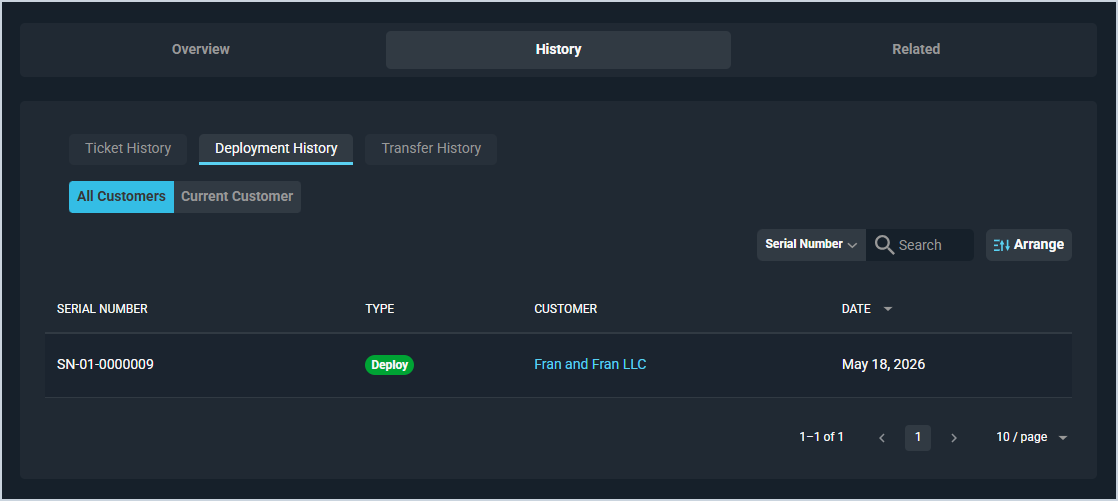
Each field on the Deployment History tab is defined below.
| No. | Label | Definition |
|---|---|---|
| 1 | Serial Number | Serial number of the asset associated with the deployment event. |
| 2 | Type | Type of deployment event, such as Deploy. |
| 3 | Customer | Customer the asset was deployed to. Click the link to open the customer profile. |
| 4 | Date | Date the deployment event occurred. |
The following actions are available on the Deployment History tab.
- Filter the deployment history to show all customers or the current customer only by clicking the All Customers or Current Customer toggle buttons.
- Search the deployment history by selecting a column from the dropdown and entering text in the Search field.
- Customize which columns display in the list and the order in which they display by clicking the Arrange button. See the Arrange Columns article for more information.
- Sort the results in the table by clicking the column label in the table header.
Transfer History Tab
The Transfer History tab displays a log of all ownership transfers for the asset, showing which customers have owned it and when.
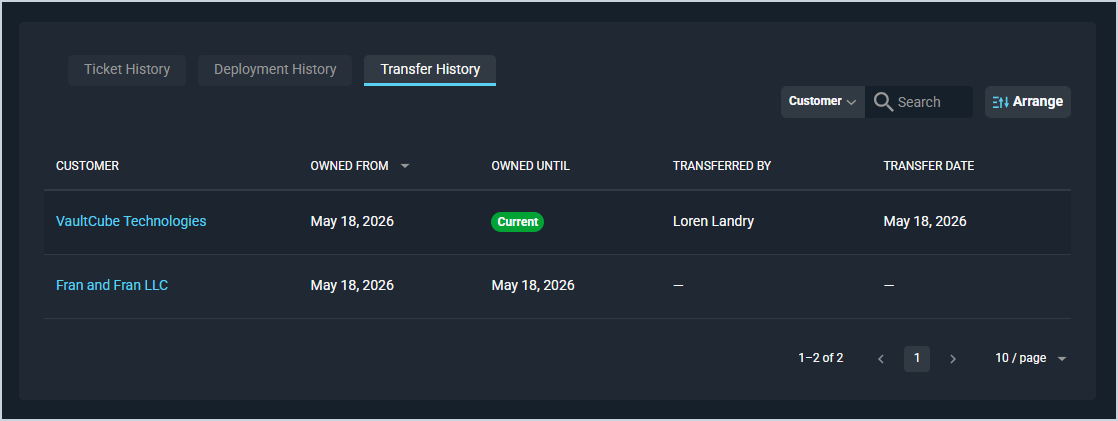
Each field on the Transfer History tab is defined below.
| No. | Label | Definition |
|---|---|---|
| 1 | Customer | Customer who owned the asset during this period. Click the link to open the customer profile. |
| 2 | Owned From | Date the customer took ownership of the asset. |
| 3 | Owned Until | Date the customer's ownership ended. Displays as Current for the active owner. |
| 4 | Transferred By | User who performed the transfer. |
| 5 | Transfer Date | Date the transfer was performed. |
The following actions are available on the Transfer History tab.
- Search the transfer history by selecting a column from the dropdown and entering text in the Search field.
- Customize which columns display in the list and the order in which they display by clicking the Arrange button. See the Arrange Columns article for more information.
- Sort the results in the table by clicking the column label in the table header.
Tabs on the Asset Detail View
For information on other tabs on the asset detail view, see the related articles.