
Add/Edit Ticket Activity Macros
The Add Ticket Activity Macro and Edit Ticket Activity Macro screens allow you to create and edit ticket activity macros in your instance. Ticket activity macros define predefined actions and values that can be applied to an existing ticket, including status updates, tech assignments, and activity notes. To add a new ticket activity macro, click the Add Ticket Activity Macro button from the Ticket Activity Macros section on the Tickets tab in the Macros category on the System Settings screen.
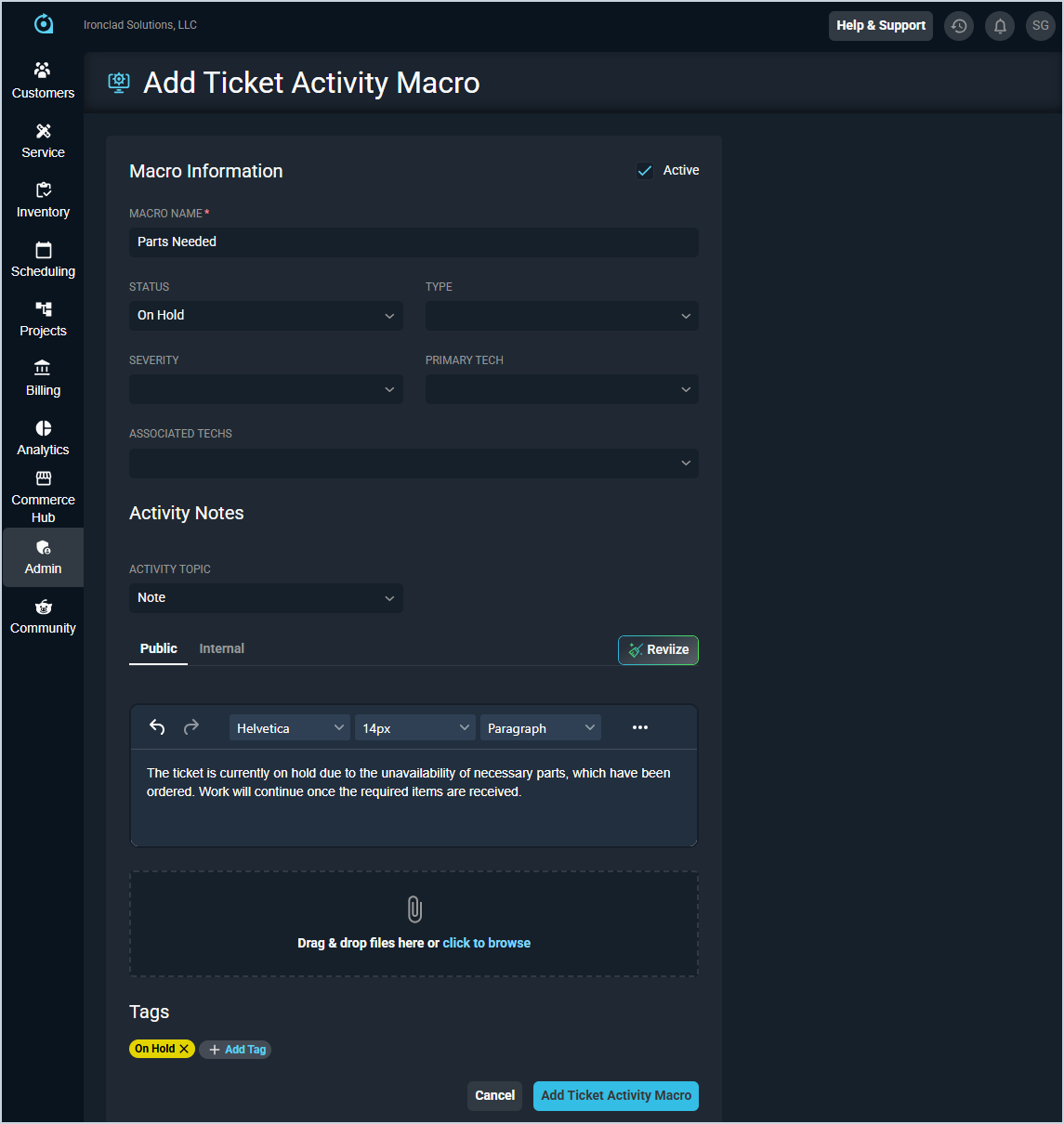
Each field on the Add Ticket Activity Macro screen is defined below.
| No. | Label | Definition |
| 1 | Active | Check this option to make the macro active and available for use on tickets. |
| 2 | Macro Name | Name of the macro. |
| 3 | Status | Status that will be applied to the ticket when the macro is used. |
| 4 | Type | Ticket type that will be applied to the ticket when the macro is used. |
| 5 | Severity | Severity that will be applied to the ticket when the macro is used. |
| 6 | Primary Tech | Primary tech that will be assigned to the ticket when the macro is used. |
| 7 | Associated Techs | Additional techs that will be associated with the ticket when the macro is used. |
| 8 | Activity Topic | The topic type for the activity note that will be added to the ticket when the macro is used. |
| 9 | Public | The public-facing activity note content that will be added to the ticket when the macro is used. |
| 10 | Internal | The internal activity note content that will be added to the ticket when the macro is used. |
| 11 | Attachments | Files to attach to the activity note. Drag and drop files or click to browse and select files from your device. |
| 12 | Tags | Tags that will be applied to the ticket when the macro is used. Click the + Add Tag button to add tags to the macro. |