
Add/Edit FTP Sites
Any provider of ratable products will send Call Detail Reports (CDR) via File Transfer Protocol (FTP) Sites. It is imperative that these sites are monitored regularly to prevent billing errors. The New/Edit FTP Site screens allow you to enter and edit details for the FTP sites you want to configure in Rev.io. Once a site is created, you can manage its files from the FTP Sites list view at any time. See the FTP Sites List View article or the View FTP Site Files article for more information.
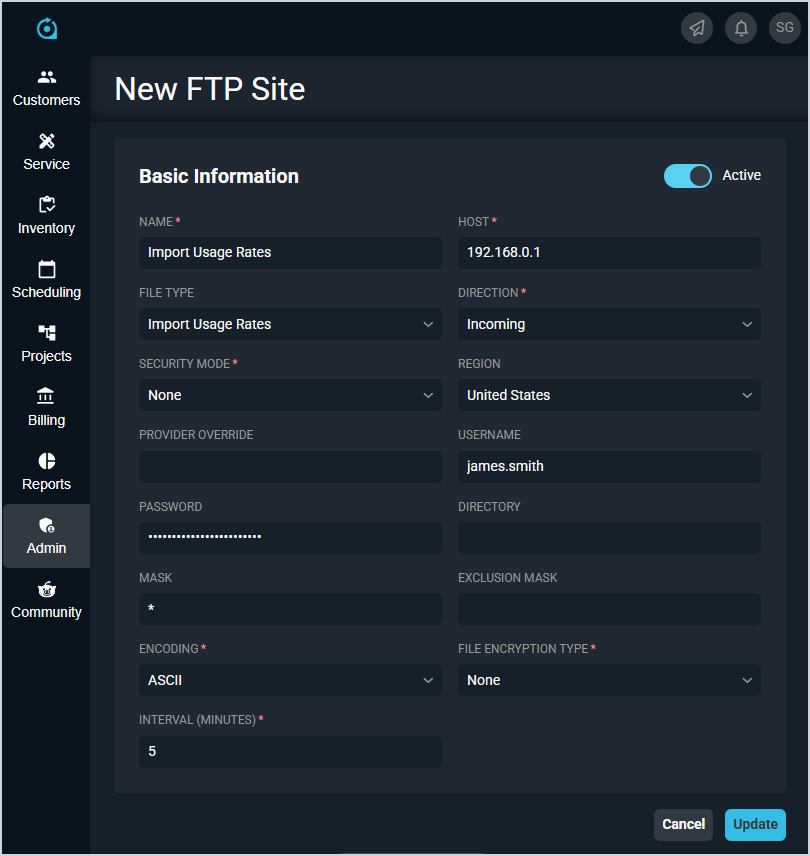
Each field on the New/Edit FTP Site screens is defined below.
| No. | Label | Definition |
| 1 | Active | Indicates the FTP site is currently active. |
| 2 | Name | Name of the FTP site. |
| 3 | Host | Host of the FTP site. |
| 3 | File Type | File type for the FTP site. |
| 4 | Direction | Direction of the FTP site. Direction options include Incoming and Outgoing. |
| 5 | Security Mode | Security mode for the FTP site. Security Mode options include None, Explicit, Explicit Control, Implicit, and SSH. |
| 6 | Region | Region for the FTP site. |
| 7 | Provider Override | Provider override for the FTP site. |
| 8 | Username | Username for the FTP site. |
| 9 | Password | Password for the FTP site. |
| 10 | Directory | Directory for the FTP site. |
| 11 | Mask | Mask for the FTP site. |
| 12 | Exclusion Mask | Exclusion mask for the FTP site. |
| 13 | Encoding | Encoding for the FTP site. Encoding options include Default, ASCII, and Binary. |
| 14 | File Encryption Type | Encryption type for the FTP site files. File Encryption Type options include None, OpenPGP, and OpenPGP 4096. |
| 15 | Interval (Minutes) | Interval in minutes for the FTP to sync. |