
Quoting Macros List View
The Quoting Macros list view displays all quoting macros configured in your Rev.io environment. Quoting macros allow you to pre-define a set of products and services that can be quickly applied when building quotes, saving time on frequently quoted configurations. The Quoting Macros list view is accessible by navigating to Admin > Quotes > Quoting Macros tab.
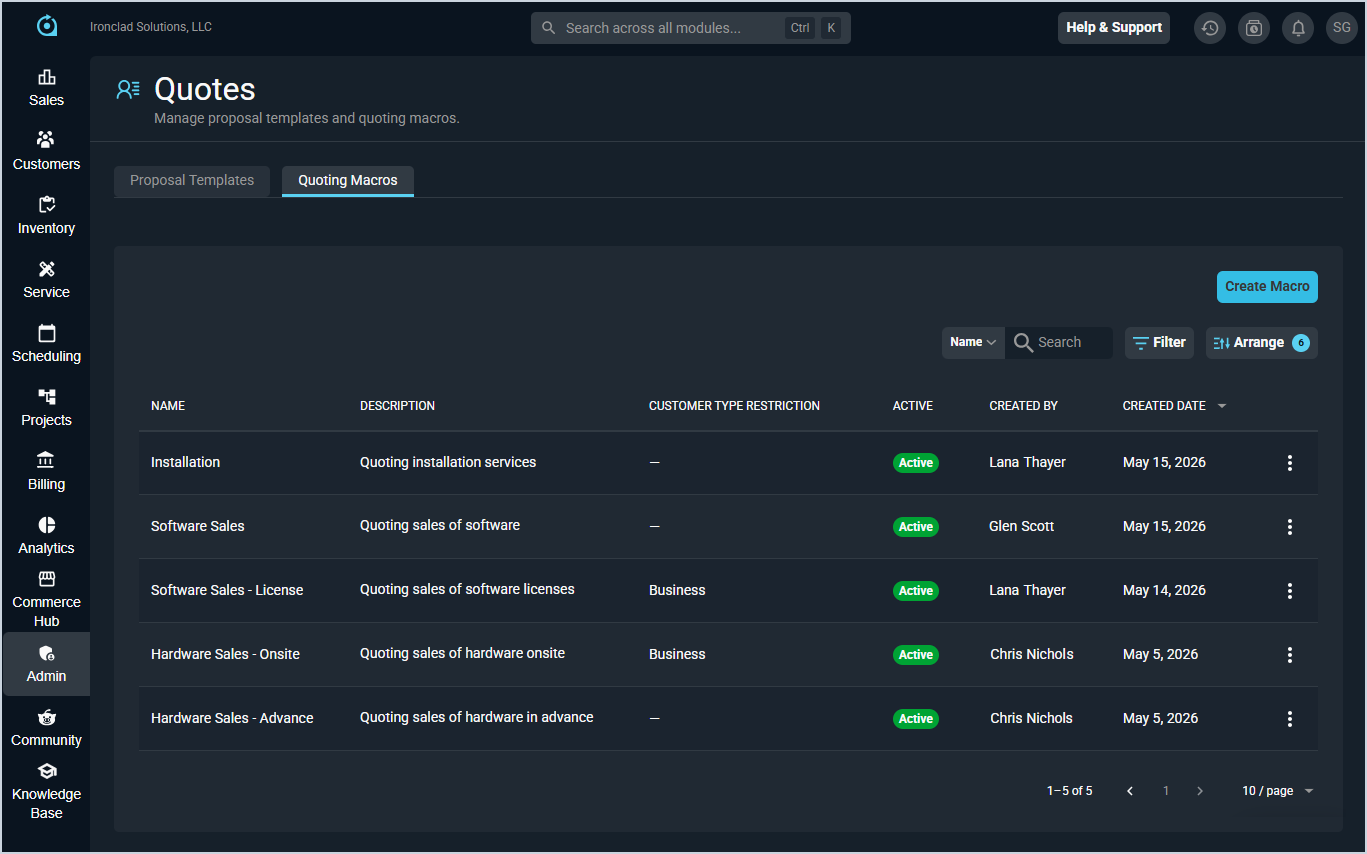
Each column in the Quoting Macros list view is defined below.
| No. | Label | Definition |
| 1 | Name | Name of the quoting macro. |
| 2 | Description | Description of the quoting macro. |
| 3 | Customer Type Restriction | Customer type the macro is restricted to, if applicable. If blank, the macro is available for all customer types. |
| 4 | Active | Indicates whether the quoting macro is currently active and available for use on quotes. |
| 5 | Created By | User who created the quoting macro. |
| 6 | Created Date | Date the quoting macro was created. |
The following actions are available on the Quoting Macros list view.
- Create a new quoting macro by clicking Create Macro. See the Create/Edit Quoting Macros article for more information.
- Search for a specific macro by entering text in the Search field.
- Filter the list by clicking the Filter button.
- Sort the list by clicking a column label in the table header.
- Customize which columns display in the list by clicking the Arrange button. See the Arrange Columns article for more information.
- Edit or delete a quoting macro by clicking the ellipsis at the end of the row and selecting the appropriate option.