
The following items will be released by the end of the day today to coincide with the conclusion of our two-month development iteration. We will return to our normal release schedule tomorrow for our next release this Thursday, 8/6/26.
Interested in taking a deep dive on different features in Rev.io? Check out our Power Hour webinar series.
New Features
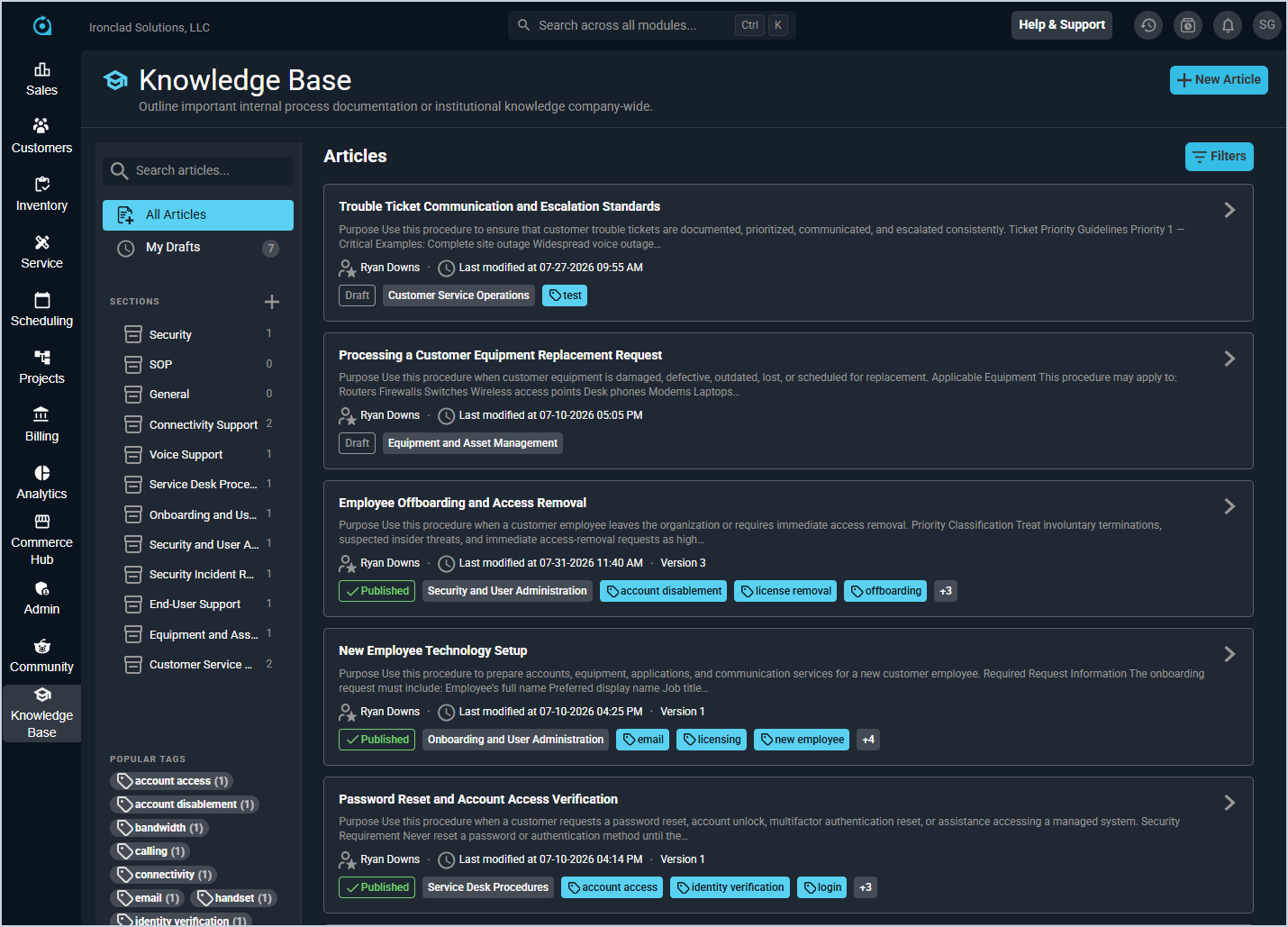
- A new Knowledge Base is now available in Rev.io, allowing you to build and organize internal documentation such as SOPs, run books, and ticket resolutions to train your team on company processes. Articles can be organized using sections and tags for easy navigation and retrieval. Role-based access control permissions and audit logging are included to ensure content is managed securely. In a future release, Revii will be able to use your knowledge base content to provide more accurate, company-specific responses.
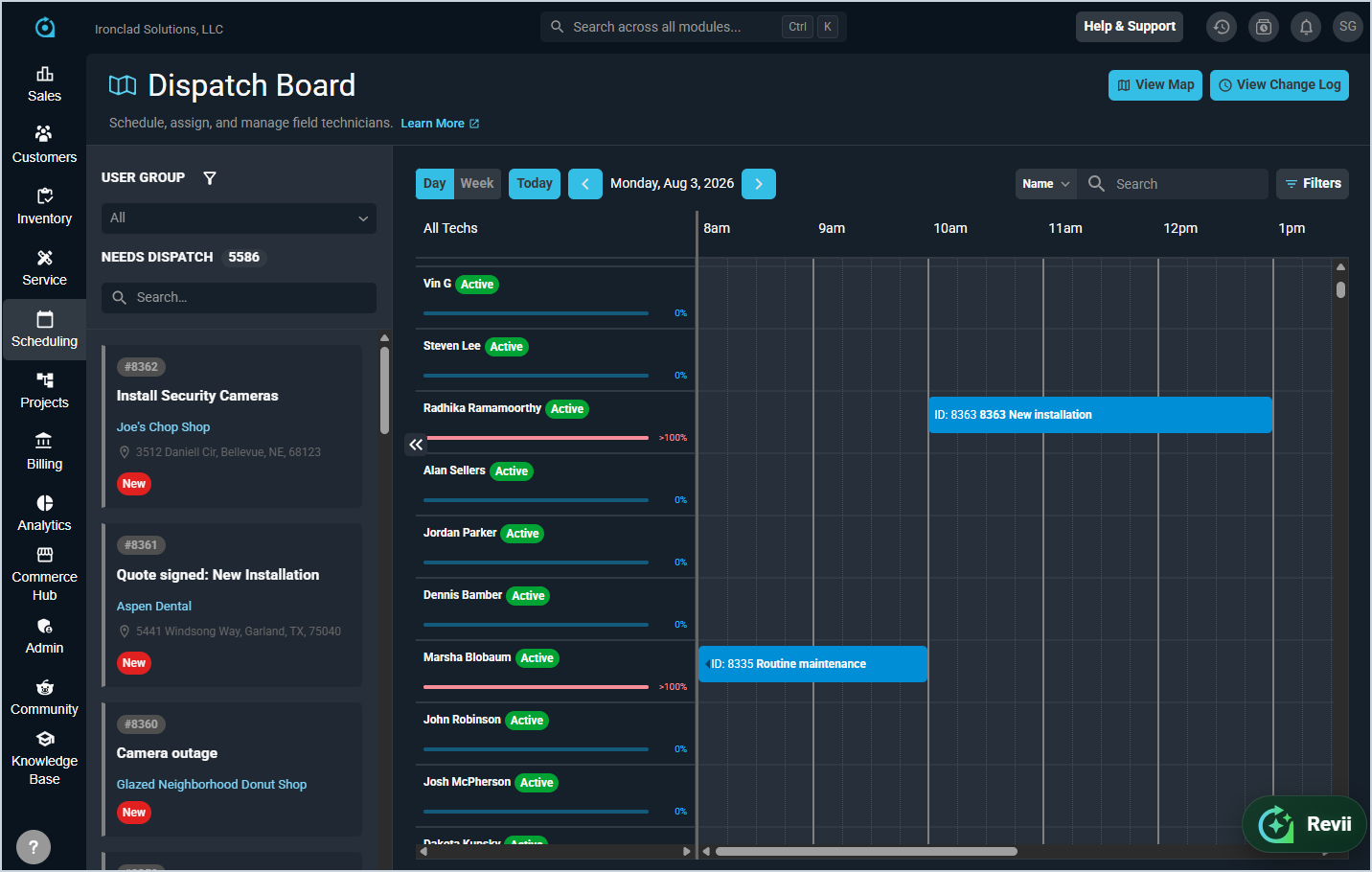
- The Dispatch Board has been significantly enhanced with several new capabilities. The header now includes quick access to the dispatch map, and the Needs Dispatch queue panel displays unassigned tickets with color-coded severity indicators, search functionality, and the ability to expand or collapse the panel. Clicking a ticket card opens a slide-out panel displaying customer information, ticket details, SLA deadlines, and work requested. Tickets can be filtered and organized by user group using dispatch views, with customizable filters for ticket type, priority, and severity that save automatically per user group and user combination. A new calendar view allows you to visualize and manage technician schedules in day and week formats, with color-coded progress bars showing scheduled versus available hours. Tickets can be dispatched by dragging them from the queue to a technician's calendar slot, which opens a dispatch modal to assign technicians, set start and end times, and automatically create tasks. All dispatch actions are logged, and a new Dispatched checkbox on the ticket summary card shows whether a ticket has been dispatched. A change log tracks key actions such as tech assignments, reassignments, and scheduling changes, viewable by clicking the View Change Log button. [65687, 65795, 65826, 65851, 65908, 65932]
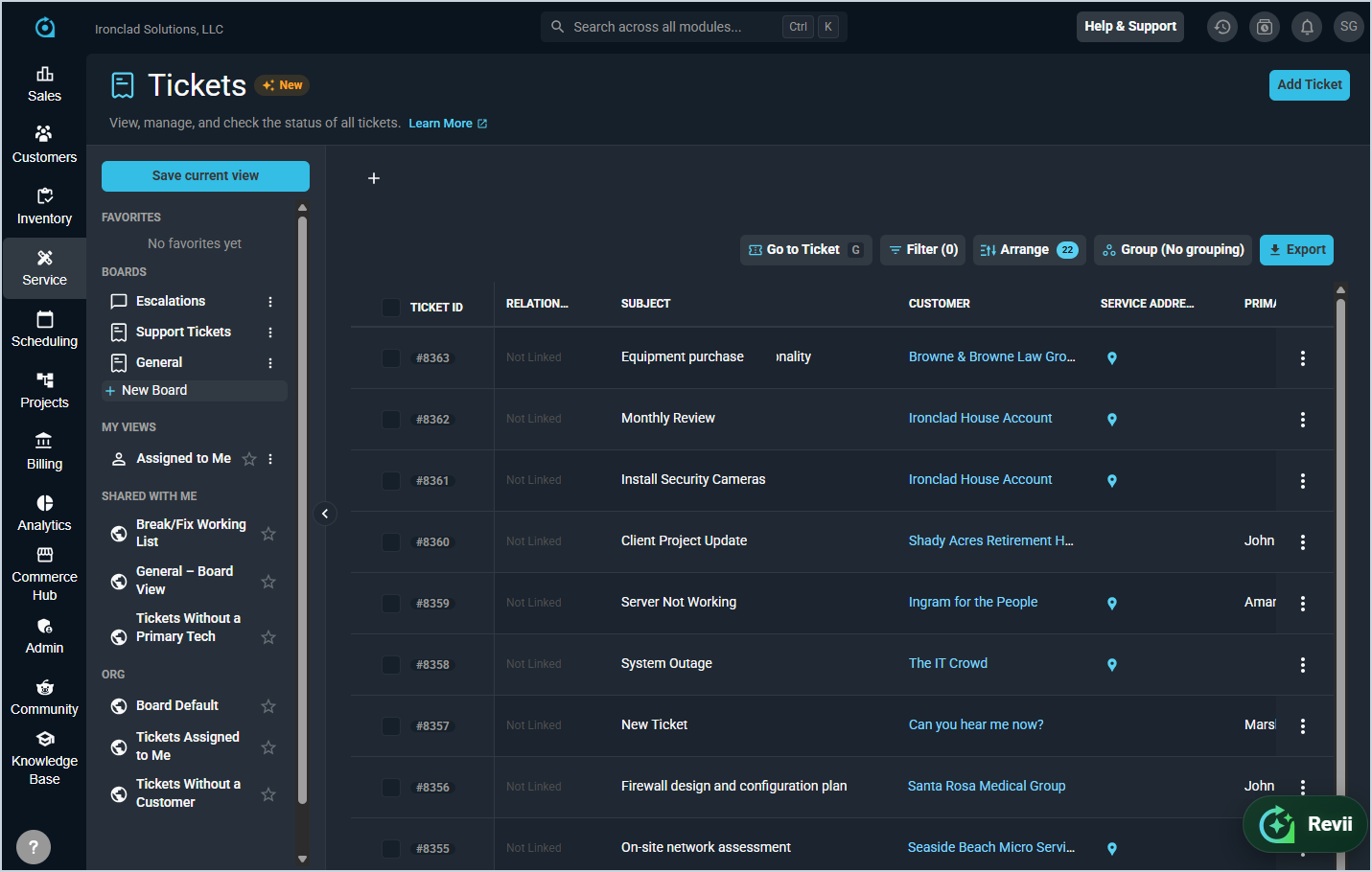
- The redesigned ticket list experience is now available as a preview and can be accessed by selecting Tickets New from the Service menu, featuring a clean streamlined grid with sorting and pagination. Saved views can be managed from a collapsible left pane with a tab strip that keeps frequently used views open, and favorited views automatically open as pinned tabs. Advanced filters can be built using multiple conditions combined with Match All or Match Any logic, supporting all available ticket fields including Status, Priority, and Primary Tech with multi-select options. The ticket list can also be sorted by Status and Type columns using your configured rank order. [65204, 65205, 65206, 65259, 65557]
- Ticket boards are now available in the new ticket list, giving teams a way to organize and route work. Boards appear in a dedicated section of the left pane, and selecting a board scopes the list to that board's tickets and opens it as its own tab. Each board can have a default view shared by everyone, while individual users can personalize columns, filters, and sorting without changing the board default. Users with the appropriate permission can save changes for everyone, save a personal view, or reset to the board default at any time. Creating, editing, and deleting boards is governed by the Create and manage ticket boards permission. [65780]
- Key ticket fields can now be edited inline directly from the ticket list and ticket detail without opening the full ticket. In the new ticket list, click a cell to update a ticket's Status, Priority, Severity, Type, Primary Tech, User Group, Tags, or Board, with changes saved immediately. On the ticket detail, the header lets you update Status, Priority, and assigned technician the same way. Closed and voided tickets remain read-only, and changing a ticket's User Group prompts you when currently assigned technicians are no longer eligible. [65782, 65859, 66034]
- Creating and editing tickets now happens in a streamlined slide-out panel that keeps you in context instead of navigating to a separate page. The panel organizes essentials such as customer, subject, and work requested alongside routing defaults, fulfillment details, and additional fields, with rich-text work requested, attachments, and ticket templates to pre-fill common values. The same panel is used to edit existing tickets, while associated items and tags continue to be managed from the ticket's own tabs. [65208, 66066]
- Exchanges can now be performed on tickets to swap defective items for replacements, tracking which items were exchanged, recording the replacement item on the ticket, and automatically updating customer assets and company inventory when the exchange is invoiced. [65609]
Updates
- Rev.io now integrates directly with QuickBooks Desktop through Intuit's free Web Connector, eliminating the need for CSV exports or third-party import tools. You can build and review invoice queues for any date range and post them to QuickBooks in a single sync, with automatic duplicate protection, customer and item synchronization, GL code mapping, and configurable sales tax support. [66143]
- The CMS integration now syncs alarm and activity history into Rev.io, creating a dedicated history ticket for each linked customer where new events are automatically appended as internal notes every 4 hours. History sync is optional and can be enabled in the CMS integration settings. [64777]
- The Acronis integration now syncs licensing into Rev.io as assets, with each Acronis offering appearing as a License asset on the customer account displaying quota and current usage. Assets refresh automatically every 2 hours, and removed licenses are marked as Inactive. [64781]
- COPS-linked customers can now be placed on test and taken off test directly from Rev.io without logging into the COPS portal. A new Place on Test / Stop Test button appears in the Actions column of the customer's Integrations tab for any customer linked to a COPS account. Select a duration to immediately suppress alarm dispatching in COPS. The button displays the current test state and expiration time at a glance, and a single click ends the test early when needed. Re-placing an account already on test simply updates the window, and stopping a test that is not running does nothing.
- A personal email signature can now be saved in My Preferences and inserted into ticket emails or used as a token in workflow notifications. Signatures support HTML formatting for rich text styling.
- A new Create and manage ticket boards permission in the Ticketing section of the role editor controls who can create, edit, and delete ticket boards. By default, only admin users have this permission. [65329, 65333]
- Ticket statuses, types, priorities, and severities can now be reordered in System Tables by dragging to arrange them in your preferred sequence. The system honors your configured ranking across all ticket forms, filters, and bulk actions, and the tag picker now surfaces your most frequently used tags first. [65104, 65105, 65729]
- The project experience has been redesigned into a more unified planning view, allowing you to manage phases, milestones, tasks, and tickets together and create them directly from the Planning area without jumping between screens. Key planning fields such as status and dates can be updated inline. Project headers are easier to scan and update, and linking between phases, tickets, tasks, milestones, and quotes is faster and more flexible.
- Billing teams can now create charges directly from project billable items, supporting progress billing workflows within the product. Project billing workflows now have better support for consolidated billable items and invoice descriptions.
- Revii can now view and act on more project information, including projects, milestones, phases, work items, and project notes, with improved request matching to help Revii respond more accurately to project-related questions.
- Two new time-based workflow triggers are now available for tickets: Ticket Status Stale and Ticket No Movement. These options allow you to receive notifications when a ticket hasn't changed status or had activity logged within a configured amount of time. You can control the unit of time (minutes, hours, or days), the interval, and whether the trigger fires before or after the threshold is reached. This sets the foundation for additional future time-based notifications. [64650]
Bug Fixes
- Removing a package from a service now correctly disconnects both the package products and the service when the removal date is set to today or a past date, and packages can now be removed without first removing individual products. [65796]
Mobile Updates
- We are retracting an item from the 7.30.26 release notes. The Revii 2.0 backend platform integration for the mobile app is not yet available and will be announced in a future release. [64736]