
Check out the latest updates in Rev.io as of 7/2/26!
Interested in taking a deep dive on different features in Rev.io? Check out our Power Hour webinar series! New topics are added to the schedule every week.
New Features
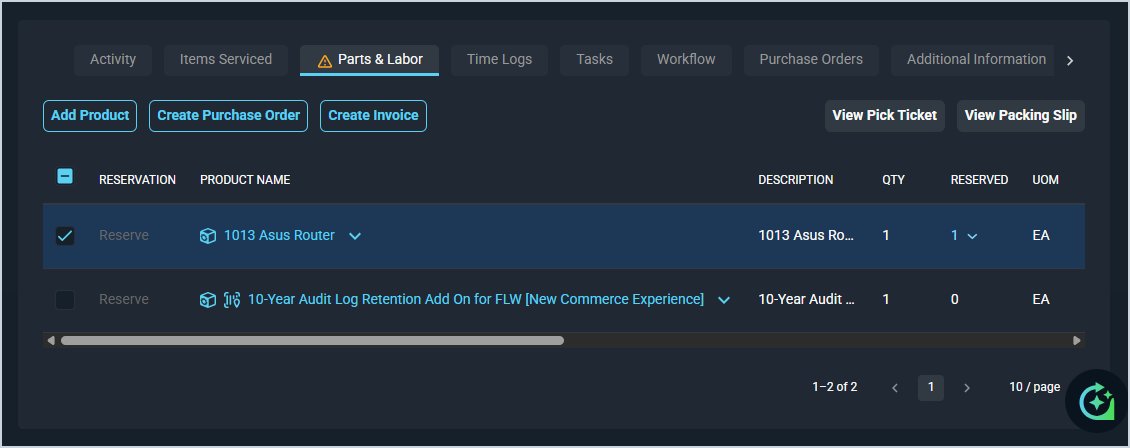
- Multiple invoices can now be created for a single ticket by selecting specific items and labor to invoice at different times, allowing you to bill customers incrementally as work progresses. The Parts & Labor grid now includes checkboxes to select items for invoicing, displays amounts already invoiced and remaining balances for each line item, and provides a Create Invoice button for selected items while keeping the ticket open.📍Service > Ticket List > Select a ticket > Parts & Labor tab > Select item(s) > Create Invoice button. [65064]
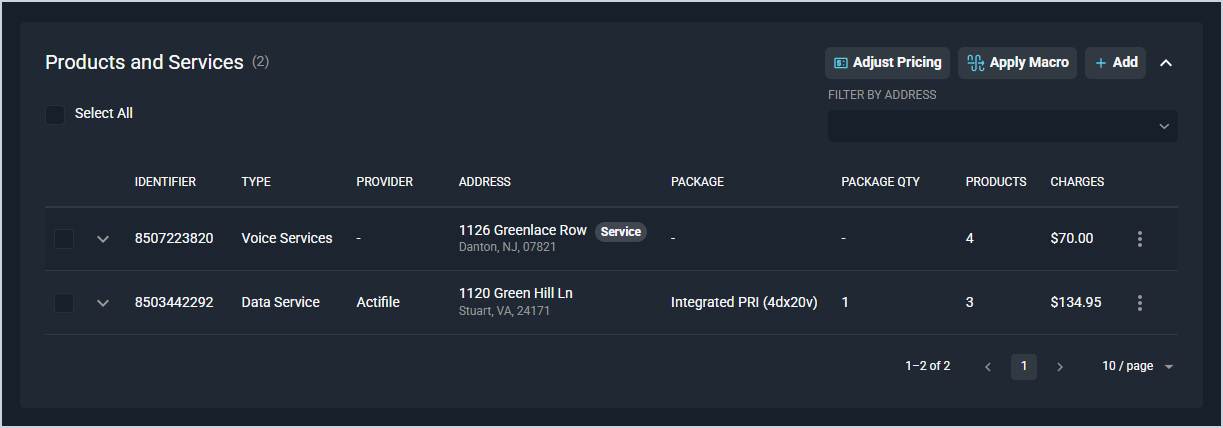
- The Price Adjustment tool now allows users to apply percentage or fixed amount adjustments to quote line items, with totals recalculating automatically.📍Customer > Quote List > Select a quote > Products and Services section > Adjust Pricing button. [65330]
Updates
- The Datto RMM integration now automatically creates tickets from device alerts by checking Datto RMM every 5 minutes and opening a ticket for each new alert that meets your configured severity and filtering rules, then automatically closing the ticket when the alert resolves. [64757]
- The ConnectWise RMM integration now syncs endpoints into Rev.io as assets. Choose which endpoint categories to sync (platform, network, cloud) and the Rev.io asset type to apply, and the integration keeps those assets up to date on each matched customer. Optionally, it can write the Rev.io asset ID back onto the ConnectWise RMM endpoint so the two records stay cross-referenced. Turn it on or off with the Enable Asset Sync setting.
- When creating a proposal, product descriptions can now be enabled to display alongside each line item on the customer-facing document. Descriptions are pulled from the product catalog and can be edited directly on individual proposals without affecting the source catalog. [64902]
- Budget hour warnings now alert you when time entries cause a project budget to exceed its allocated hours. [65200]
- A contact record can now be created directly from a ticket by clicking the + icon next to an unknown associated contact, opening a pre-populated contact form to convert the unknown contact into a linked customer contact. [65268]
- Deposit invoices can now be created based on a percentage of the remaining balance on a project. [64681]
- Address autocomplete is now disabled when a country other than United States is selected, allowing manual entry of international addresses. The feature remains active for US addresses and switches immediately as the country selection changes. [65221]
- The address editor on the Summary tab now matches the experience on the Add and Edit Customer pages, including address lookup and autocomplete, the Country field, and inline validation. [65432]
- The Parts & Labor tab on tickets now displays an icon indicator when the ticket contains unbilled items. [65228]
- Customer identity can now be changed between Business and Residential directly in PSA Web on both the Edit Customer page and the profile summary inline edit. [65304]
- Project status management has been improved for better organization and accuracy of project data. [65286]
Bug Fixes
- In-app notifications are now delivered reliably after resolving a routing issue that caused notification requests to fail when the PSA API configuration was updated. [65106]
- When editing a ticket and assigning the flow currently being viewed, the selection modal now properly closes after assignment. [65129]
- When approving a quote with a parent/child account structure, child accounts now correctly change to open status, generate initial charges, and default the billing address to the parent account address. [65138]
- Inactive options are now correctly filtered out of the route selection dropdown when adding a crossflow route. [65203]
- Phase and action descriptions now correctly allow up to 8000 characters, resolving a validation error caused by an incorrect 255 character limit being enforced despite the interface showing higher limits. [65207]
- Long unbroken text strings in phase and action descriptions in the Workflow Builder now wrap correctly instead of overflowing off the screen. [65232]
- Drafted notes and activity details on a ticket are now saved when switching to a different browser tab, preventing loss of work when referencing other sources. [65239]
- The time entry reason dropdown now correctly displays all active admin reasons when creating a time entry from the navigation bar. [65266]
- Proposal documents now correctly display the logged-in user's name and email as the signer instead of Rev credentials when the customer has no email address on file. [65424]
- Creating deposit invoices in project billing no longer generates duplicate invoices.
Mobile Updates
Due to App Store and Google Play approval processes, these updates may take time to appear in the app.
- Quotes can now be created, edited, and managed directly in Rev.io Mobile, including viewing quote lists, managing products and services, applying quote macros, creating and sending proposals, managing addresses and contacts, adding notes and attachments, approving draft quotes, and regenerating quote-generated tickets. [64529]
- Address autocomplete is now supported on address forms in Rev.io Mobile, automatically populating address fields when a suggestion is selected. [65108]
- Product descriptions can now be edited directly within tickets in Rev.io Mobile from both the add product and edit product forms. [65301]