
Check out the latest updates in Rev.io as of 6/12/26!
Interested in taking a deep dive on different features in Rev.io? Check out our Power Hour webinar series! New topics are added to the schedule every week.
New Features
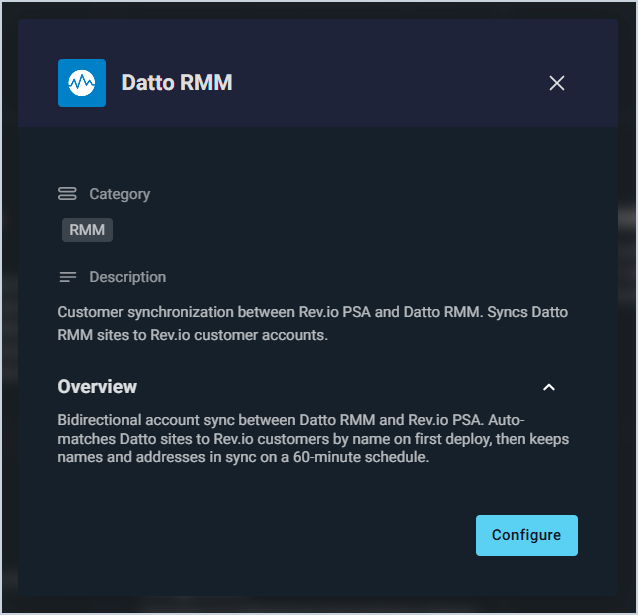
- Rev.io PSA now integrates with Datto RMM, automatically matching Datto RMM sites to Rev.io customer accounts by name. Once linked, account data syncs bidirectionally every 30 minutes with Rev.io as the source of truth, with support for all Datto RMM platforms. 📍Admin > Integrations Library > Marketplace tab > RMM section. [64739]
Updates
- The Device Details tab on the asset detail page now includes Subnet Mask and Gateway fields below IP Address and MAC Address. For RMM-linked assets these fields are read-only, and for unmanaged assets they are editable. 📍Customers > Asset List > Select an asset > Overview section > Device Details tab. [64183]
- The Send Email modal on purchase orders now uses the same modern design as the invoice email modal, with a rich-text editor, inline attachment preview, and optional Cc and Bcc fields. 📍Inventory > Purchase Orders > Select a purchase order > Email button. [64187]
- Purchase order PDFs now include configured custom fields in a dedicated Additional Information section, displayed below the vendor header and above the line items table. 📍Inventory > Purchase Orders > Select a purchase order > Email button > Purchase order attachment. [64184]
- A Memo field can now be added to purchase orders to separate general vendor notes from shipping instructions. 📍Inventory > Purchase Orders > Select a purchase order > Shipping section. [64185]
- The Inventory Matrix screen now includes a Location Type filter to narrow your view by warehouse, vehicle, customer site, or any other configured location type. When selected, the location filter automatically updates to show only matching locations. 📍Inventory > Inventory Management > Filter Location Types dropdown above the grid. [64186]
- Tickets can now be printed from the ticket view or ticket list. Click Print from the ticket view for a single ticket, or select multiple tickets from the list and choose Print Tickets from the New Action menu. Printed tickets include customer details, ticket status, work requested, labor hours, parts used, items serviced, purchase orders, and signature lines. 📍Service > Ticket List > Select multiple tickets using the checkboxes at the start of the row > New Action button > Print Tickets OR Open one ticket > Print button. [64443]
- Activity notes on sales opportunities can now be edited and deleted by users with the appropriate permissions. 📍Customers > Opportunity List > Select an opportunity > Activity tab. [64482]
- Customer invoices can now be sent directly from the invoice email screen using your account's configured invoice email workflow template, with the option to confirm or adjust recipients before sending. 📍Customers > Customer List > Select a customer > Billing section > Invoices tab > Menu at the end of the row > Email. [64484]
- Workflows, workflow actions, and workflow notifications can now be duplicated, creating a new copy with "- Copy" appended to the title. 📍Admin > Workflows > Any tab > Menu at the end of the row > Copy. [64668]
- Products can now be searched on the Reservations tab of the Inventory Matrix page using the Search Products field, filtering by product name, product ID, or part number. 📍Inventory > Inventory Management > Reservations tab > Search Products. [64181]
- Inventory Management can now be set as the default landing screen in the Show At Login dropdown on the My Preferences page. 📍Admin > System Settings > My Preferences > Show At Login. [64182]
- When tickets are created via email, the system now determines the ticket type by first checking if a type is configured on the inbox that received the email, then checking if a default type is set on the customer, and finally falling back to the system default type. [64587]
- Priority, duration, and assignment strategy fields for actions in the Action Library can now be edited without affecting tasks or actions that have already been launched. 📍Admin > Workflows > Action Library. [64658]
- The invoice email page now displays a warning when no active invoice email workflow template is configured, preventing emails from being silently queued but never delivered. 📍Billing > Invoice Management > Email Invoices tab > Select multiple invoices > Email button OR Choose one invoice > Menu at the end of the row > Email. [64669]
- When creating a payment using Apply to Invoice, the payment amount can now be edited after selecting an invoice, allowing you to pay more or less than the invoice balance with any overage applied to the account. 📍Customers > Customer List > Select a customer > New Action button > Add Payment > Apply to Invoice. [64735]
- When adding items serviced to a ticket, Service is now available as an item type, pulling from the same service list used when adding parts to tickets. 📍Service > Ticket List > Select a ticket > Items Serviced tab > Add Item > Item Type. [64801]
Bug Fixes
- When unchecking the active option on the Email Setup page, the email configuration now correctly moves to inactive status and remains visible in the list. Previously, inactive configurations were hidden, which may have caused some to accumulate over time. We recommend reviewing your email configurations and deleting any that are old or no longer needed. [63903]
- Proposals now create successfully, resolving an issue with incorrect signing order during proposal creation. [64545]
- Ticket activity macros now correctly apply all field changes, including status updates and primary rep assignments, immediately when the macro is executed. [64576]
- Quote macros can now be created in the Billing Platform when only a global user is present, resolving a database constraint error that previously prevented macro creation. [64636]
- When creating an internal email activity note on a ticket, the associated contact's email address is no longer automatically populated in the recipient field. [64642]
- Descriptions in parts and labor records now support the same character limit as the product catalog, removing the previous 255 character restriction. [64647]
- In order to match requirements on tasks, the Task Action Template in workflows no longer includes "Unassigned" as an option in the assignment field. [64648]
- New ticket tags can now be created in System Settings by entering a display label and selecting a color, resolving an issue where the Display Label field was unresponsive. [64665]
- The Service Type dropdown on the Recurring Service page now correctly filters out inactive service types. [64876]
Mobile Updates
Due to App Store and Google Play approval processes, these updates may take time to appear in the app.
- Products can now be added to tickets on mobile by scanning UPC barcodes directly from the Parts and Labor section. [64229]
- Travel-start SMS notifications now include estimated arrival times calculated using Azure Maps routing with live traffic data. When Azure Maps is unavailable, the system automatically falls back to distance-based estimates. [64166]
- New customers can now be added directly from the Customer List in Rev.io Mobile by tapping the Add Customer button and completing either a business or residential customer form. [64253]
- New contacts can now be added directly from a customer's contact list in Rev.io Mobile by tapping the Add Contact button and completing the contact form. [64254]
- Customer billing information can now be viewed and edited on mobile by users with the appropriate permissions, including bill profile, account type, email, account number, billing method, net terms, account aging, and tax exemption details. [64256]
- Authorized users can now send notifications directly from Rev.io Mobile, including subject, message, priority, and recipients, using the same functionality available on the web. [64563]