---
title: "Inventory History"
url: "https://help.psarev.io/en/article/inventory-history"
language: "en"
last_updated: "2025-12-09T14:07:49.733Z"
---
# Inventory History
The Inventory History screen provides a complete log of inventory actions taken in the system, including adjustments, transfers, cost changes, purchase receipts, and reservations. It offers a detailed audit trail to help you track and review inventory activity over time.
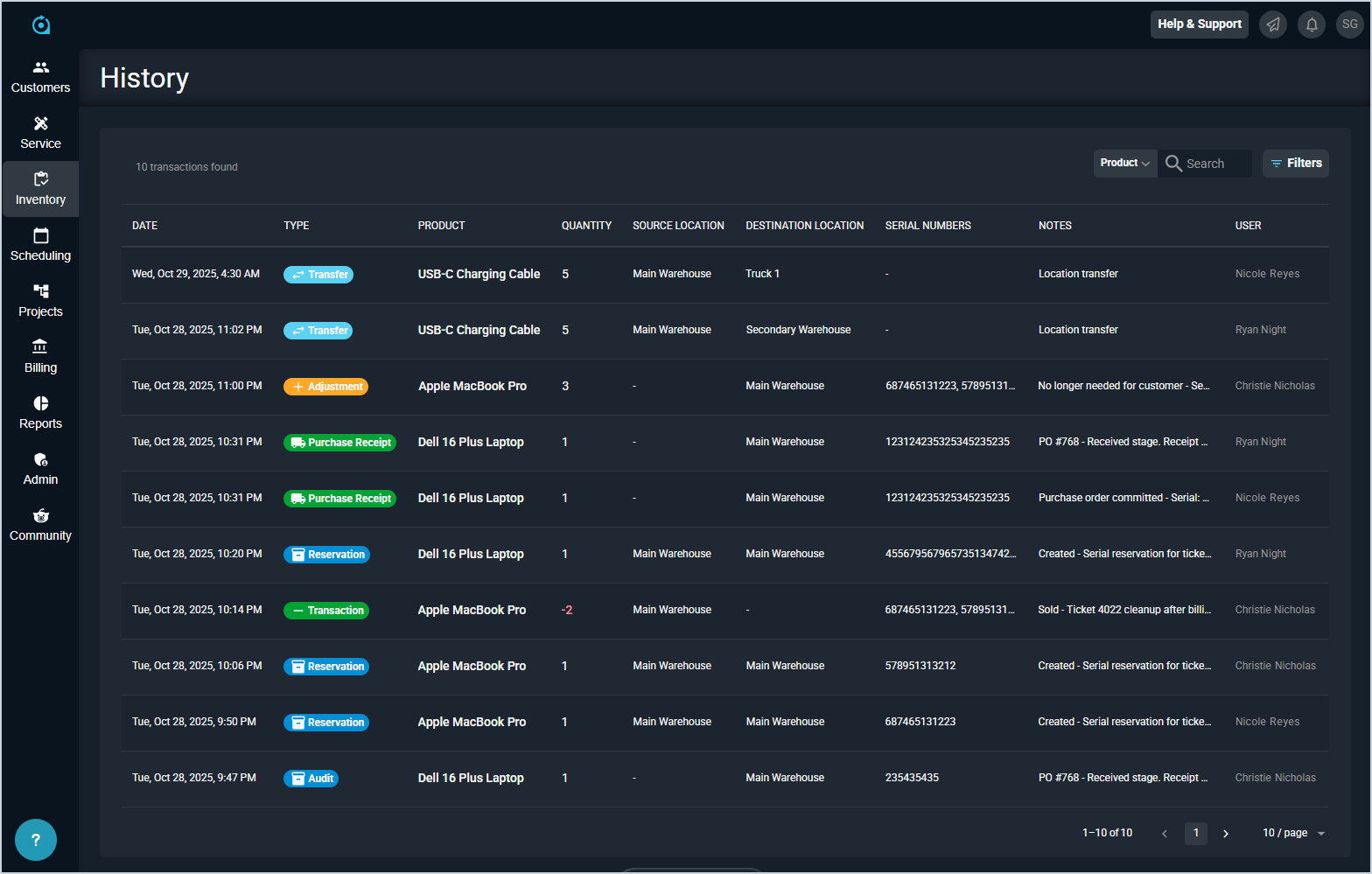
Each field on the Inventory History list view is defined below.
| No. | **Label** | *Definition* |
| --- | --- | --- |
| 1 | **Date** | *Date and time the inventory action was performed.* |
| 2 | **Type** | *Type of inventory action performed. Type options include the following.*
***Adjustment:** Increasing or decreasing inventory quantities.*
***Transfer:** Transferring products between locations.*
***Cost Change:** Updating the cost of products.*
***Purchase Receipt:** Committing purchase order receipts.*
***Transaction:** Selling products to customers from tickets.*
***Reservation:** Reserving products for use on tickets.*
***Audit:** Creating purchase orders and staging receipts.* |
| 3 | **Product** | *Name of the product included in the inventory action. View the full product name by hovering over the product in this column.* |
| 3 | **Quantity** | *Quantity of the product included in the inventory action.* |
| 4 | **Source Location** | *Location where the product was originally stored.* |
| 5 | **Destination Location** | *Location where the product was transferred.* |
| 6 | **Serial Numbers** | *Serial number for the product included in the inventory action.* |
| 7 | **Notes** | *Notes for the inventory action. Notes are either system-generated or entered by the user at the time the action is taken. View the full text of the note by hovering over the shortened note shown in this column.* |
| 8 | **User** | *Name of the user who initiated the inventory action.* |
These actions are available on the Inventory History list view.
- Search the records displayed on this view by selecting a column from the dropdown above the grid and entering text in the **Search** field. The list view updates to display only records matching your search in the column you selected.
- Filter the records displayed on this view by clicking the **Filter** button above the grid and selecting options from the **Types** and/or **Timeframe** dropdowns. The list view updates to display only records matching your filters.
- View the full product name by hovering over the name shown in the **Product** column.
- View the full text of the note by hovering over the shortened note shown in the **Notes** column.