---
title: "Add/Edit Parts & Labor Items"
url: "https://help.psarev.io/en/article/add-edit-parts-labor-items"
language: "en"
last_updated: "2025-10-30T12:59:40.318Z"
---
# Add/Edit Parts & Labor Items
The Parts & Labor tab on the ticket screen allows you to enter and edit any parts and labor items used on your tickets. Saving Billable time logs on the *Time Logs* tab also adds line items to this tab.
| **You cannot edit part/labor items created automatically from billable time logs.** Editing a billable time log also edits the associated line item on the Parts & Labor tab. See the [Create/Edit Time Logs](https://help.psarev.io/en/article/create-edit-time-logs) article for more information. |
| --- |
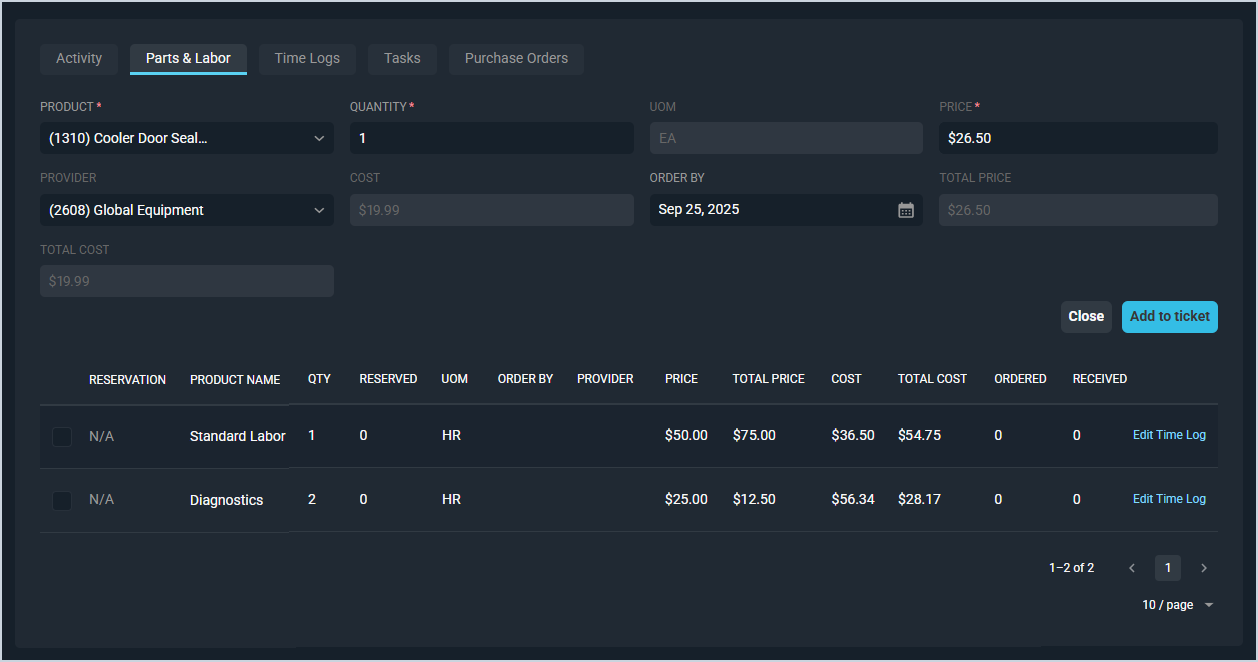
Each field on the ticket *Parts & Labor* tab for adding parts/labor items is defined below.
| **NOTE:** This article covers information about **adding/editing** parts and labor items on tickets. For information about the options available when viewing previously entered part/labor items in the lower portion of the tab, see the [View Parts & Labor Item Details](https://help.psarev.io/en/article/view-parts-labor-item-details) article. |
| --- |
| No. | **Label** | *Definition* |
| --- | --- | --- |
| 1 | **Product** | *This dropdown contains both the **Product ID** (numerical identifier for the part/labor item in your database) and the **Product Name** (name of that part/labor item).*
*Information in this dropdown is linked to your product catalog. See the* [***Add/Edit Products***](https://help.psarev.io/en/article/add-edit-products) *article for more information.* |
| 2 | **Quantity** | *Quantity of the part/labor item.* |
| 3 | **UOM** | *Unit of measurement for the part/labor item. This field is read-only and populates based on the **Product** selected.* |
| 4 | **Price** | *Amount in dollars and cents charged to the customer for the part/labor item. This field populates based on the **Product** selected but can be adjusted manually if the **Allow Price Adjustments** option is set on the Admin tab of the product. Enter a negative value to apply the product as a credit. See the* [*Product Details: Admin Tab*](https://help.psarev.io/en/article/product-details-admin-tab) *article for more information on allowing price adjustments.* |
| 5 | **Provider** | *Provider for the part/labor item. This field populates based on the **Product** selected but can be adjusted manually. See the* [***Add/Edit Providers***](https://help.psarev.io/en/article/add-edit-providers) *article for more information about configuring provider options.* |
| 6 | **Cost** | *Amount in dollars and cents paid to buy or provide the part/labor item. This field is read-only and populates based on the **Product** selected.* |
| 7 | **Order By** | *Date to order the product by, if applicable. See the* [*Create/Edit Purchase Orders*](https://help.psarev.io/en/article/create-edit-purchase-orders) *article for more information about ordering products.* |
| 8 | **Total Price** | *Total price charged to the customer for the part/labor item. Total Price = Price x Quantity. This field is read-only and calculates automatically based on the **Quantity** and **Price** fields.* |
| 9 | **Total Cost** | *Total cost paid to buy or provide the part/labor item. Total Cost = Cost x Quantity. This field is read-only and calculates automatically based on the **Quantity** and **Cost** fields.* |
These actions are available on the *Parts & Labor* tab.
- Add a new part/labor item by completing the fields listed above and clicking the **Add to Ticket** button.
- View previously entered part/labor items in the lower portion of the tab. See the [View Parts & Labor Item Details](https://help.psarev.io/en/article/view-parts-labor-item-details) article for more information.